Altimeter code: Page 3, logging model rocket flight data
Altimeter code: Page 3, logging model rocket flight data
The apogee altimeter from page 2 gives you one number. This one gives you the whole flight. It records the height ten times a second for up to a hundred seconds, keeps it in the ESP32's memory, and prints it as CSV every time you switch it on, so you can paste it into a spreadsheet and chart it. That single change turns your DIY rocket altimeter from something that tells you how high you got into something that tells you what happened.
It also does something the last one did not: it keeps three seconds of readings from before the launch, and works backwards through them to find the exact moment the rocket left the pad, so the times in your data start from zero in the right place.
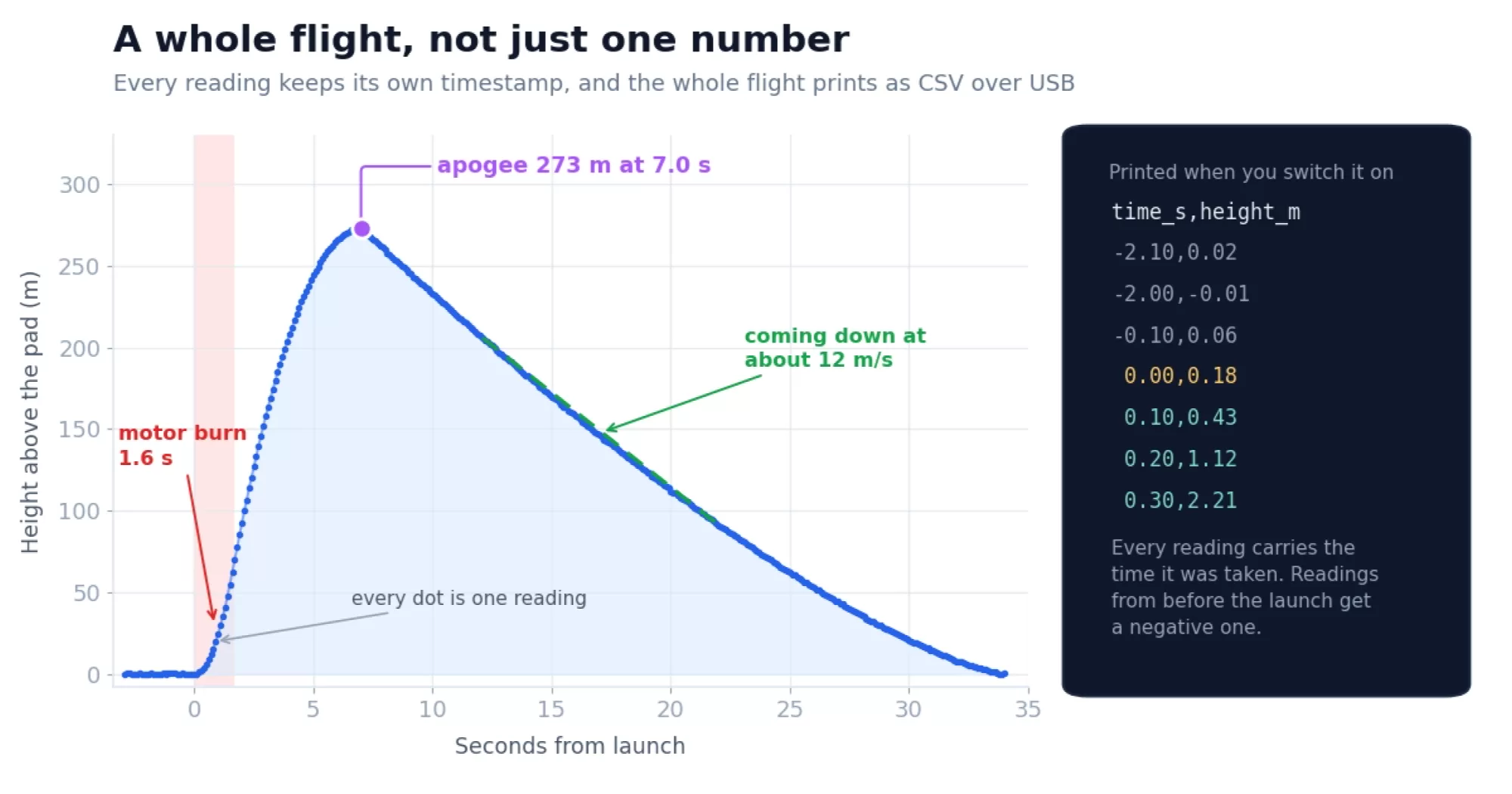
What a graph tells you that a number cannot
Once you can chart a flight, quite a lot falls out of it without any extra hardware:
- Motor burn time, from where the steep part of the climb stops steepening.
- Whether the parachute opened, and when. A deployment shows up as an abrupt change of slope. No deployment shows up as a straight line down, and a very short flight.
- Descent rate, straight off the slope. That tells you whether your parachute is the right size, which is the difference between a rocket you fly again and a rocket you pick up in pieces.
- Time to apogee, which is what you need to size a delay charge.
- Whether the altimeter itself behaved. Spikes, steps and drift are obvious in a graph and invisible in a single number.
Collect in memory, save at the end
The flight is gathered into an array in RAM while it happens, and written to flash once the rocket is back on the ground. That is a choice made for simplicity, and it is worth being clear that it is not because flash is slow or unreliable. It is neither.
What is actually slow is the filesystem
LittleFS and FAT do bookkeeping on every write: finding a free block, updating metadata, keeping the wear levelling honest. Push a few bytes through one of those ten or fifty times a second and you are doing a great deal of work per useful byte, and each write takes a different length of time depending on what housekeeping it happens to trigger. That variability, rather than the flash itself, is what makes filesystem logging awkward inside a tight sample loop.
Raw flash is quick and predictable
Set aside a partition with no filesystem on it at all, erase the sectors in advance, and write whole pages into it. A page program is typically well under a millisecond and takes about the same time every time. The expensive operation is the sector erase, tens of milliseconds, which is exactly why you get it out of the way before the flight rather than during it. Done that way, writing to flash while flying is entirely practical, and it is how continuous flight logging is really done.
This is what our own altimeters do. The Mercury's flash layout reserves a region called mybuffer, 816 kB with no filesystem on it, sitting between the firmware and the LittleFS partition. Flight samples stream into it as fixed 26 byte records at up to four hundred a second while the rocket is in the air.
There is a second reason for that beyond speed. Anything sitting in RAM is gone if the battery browns out on a hard landing. Anything already written to flash is not.
So why RAM here
Because a hundred seconds of this flight is 4 kB, which fits in RAM without a thought, and because the loop then does exactly one thing per beat. Raw partition logging means managing offsets, erasing ahead of time, choosing a record format and handling the point where you run out of room. That is a project in its own right, not a paragraph on a beginner's page. Start with the simple version that works, and reach for the other one when you need a log longer than your memory or want it to survive a bad landing.
The one thing worth avoiding either way is NVS, the settings store this sketch saves into at the end. It is the right tool for a single 4 kB blob written once per flight, and the wrong one for a stream, because it does its own housekeeping and compaction as it fills. On page 4 the flights move into LittleFS, which is built for files, still written after the flight rather than during it.
Store the time, do not assume it
Each reading keeps two things: the height, and the reading on the clock when it was taken.
struct Sample {
  uint32_t ms;            // millis() when the reading was taken
  float    m;             // height above the pad, in metres
};

Sample flight[LOG_MAX];
It would be tempting to leave the time out. Readings are taken every 100 ms, so reading number 40 must be at 4 seconds, and you could work the whole column out from the position in the array. That is true right up until it is not. If the sensor fails to answer, the loop skips that beat and carries on, and from that point every time in the file would be one beat early. Recording the clock costs four bytes a reading and removes the doubt entirely, and it means you can change the sample rate later without any of the maths changing.
How much fits
Eight bytes a reading and a thousand readings, so a full hundred second log is 8 kB. In RAM that is nothing. Getting it into NVS takes one line of care.
The Arduino default partition scheme gives NVS 20 kB, arranged as five pages of 4 kB with one always held back for tidying up, so about 16 kB is really usable. The catch is that updating a stored blob normally needs room for the new copy alongside the old one until the write finishes, and 8 kB twice is 16 kB, which is the whole thing. Deleting the old copy first means only one ever has to fit:
memory.remove("log");                    // free the old copy first
size_t wrote = memory.putBytes("log", flight, wanted);
The sketch also checks what putBytes says it wrote, and complains if it is not what was asked for. Assuming a write worked is how you find out it did not several flights later.
Finding the moment it left the pad
Here is the awkward bit. The launch is detected when the height passes two metres, and by then the rocket has already been moving for a few tenths of a second. If you started the log there, everything would be shifted, the first part of the boost would be missing, and the numbers you read off the chart would all be slightly wrong.
You cannot go back in time, but you do not have to, because the ring buffer from page 2 already holds the last ten seconds of pressure. When a launch is detected, the sketch converts the most recent three seconds of that buffer into heights and uses them as the beginning of the log. So the recording starts before the launch did.
Then it walks backwards through those readings in two steps:
- From the reading where the launch was noticed, go back to the last one below 0.7 m. That is roughly where the climb began.
- Carry on for up to another 400 ms, looking for one below 0.2 m. That is the pad itself.
Whichever reading it lands on becomes time zero, and everything before it gets a negative time in the CSV.
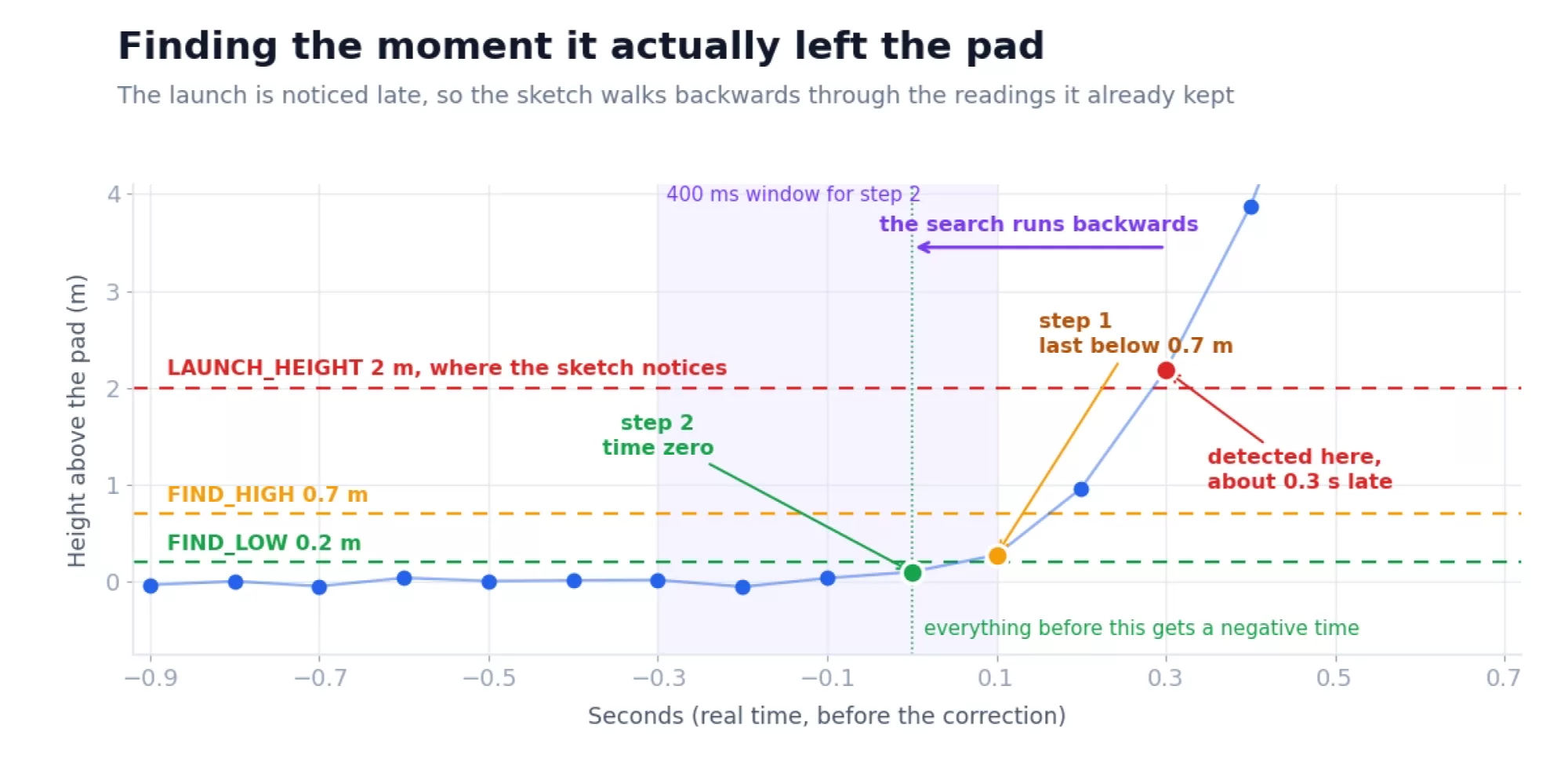
The second step needs the limit. Without it, a slow drift on the pad could carry the search back through several seconds of nothing and put time zero somewhere silly. With it, the search either finds the pad within 400 ms or gives up and uses what step one found. In testing this lands within one reading of the true launch, which at ten readings a second is as good as this altimeter can be.
Getting the data out
There is no card slot and no WiFi in this project, so the data comes out the way it went in: over the USB cable. Switch the board on with the Serial Monitor open and the whole flight prints as CSV.
The dump starts with a line of diagnostics: how many readings there are, which one was chosen as the launch, and the raw clock values at each end of the log. It looks like noise until something is wrong, at which point it tells you exactly what. If zero is ever greater than count, the times in the CSV will be wrong and that line is why.
count=133  zero=21  first_ms=8900  zero_ms=11000  last_ms=22100
Stored flight: 133 readings, apogee 273.43 m at 7.00 s, duration 11.10 s

time_s,height_m
-2.10,0.02
-2.00,-0.01
-0.10,0.06
0.00,0.18
0.10,0.43
0.20,1.12
0.30,2.21
Select from time_s,height_m to the end, copy, paste into a text editor, save it as flight.csv, and open it in Excel, Numbers, LibreOffice or Google Sheets. Chart it as a line with time along the bottom. That is your flight.
The headline numbers are printed at the top on purpose, so you do not have to scroll through a thousand lines to find out how high you went. Small thing, but you will appreciate it at a launch site with a laptop balanced on the boot of a car.
The sketch
Same shape as page 2, with the same four states, so most of it will look familiar. What is new is startLog(), addToLog(), findTimeZero() and printFlight() at the bottom.
/*
  03_flight_logger.ino

  Mercury altimeter project 3: a logging altimeter

  Part of the Altimeter Cloud "Build your own altimeter" series.
  https://www.altimetercloud.com/es/rocketry-news/

  Records the whole flight instead of just the highest point. Ten readings a
  second for up to a hundred seconds, kept in the chip's own memory, and
  printed as CSV every time you switch it on so you can paste it into a
  spreadsheet and look at the shape of the flight.

  It also keeps three seconds of readings from BEFORE the launch, and works
  backwards through them to find the moment the rocket actually left the pad,
  so the times in the file start from zero at the right place.

  On the desk it triggers at 2 metres so you can test it by lifting it off
  the table. Change LAUNCH_HEIGHT before you fly it.

  Hold BUTTON while switching on to wipe the stored flight.

  Libraries needed (Arduino Library Manager):
    Adafruit NeoPixel        by Adafruit
    Adafruit BMP5xx Library  by Adafruit
    BMP388_DEV               by Martin Lindupp

  Board settings: ESP32C6 Dev Module, USB CDC On Boot ENABLED, Flash Size 4MB,
  Partition Scheme "Default 4MB with spiffs", CPU 160MHz.
*/

#include <Wire.h>                 // talking to chips over the two wire I2C bus
#include <Preferences.h>          // storing things in flash so they survive a power off
#include <Adafruit_NeoPixel.h>    // driving the status LED
#include <Adafruit_BMP5xx.h>      // the BMP581 pressure sensor, newer boards
#include <BMP388_DEV.h>           // the BMP390 pressure sensor, older boards


// ------------------------------------------------------------------
// The Mercury V1 pins. These are the same on every board.
// Using your own ESP32? Change these to the pins you wired.
// ------------------------------------------------------------------
#define LED_POWER      3    // Powers the status LED. Must be HIGH
#define LED_DATA       2    // Status LED data line
#define SENSOR_POWER  20    // Powers the pressure sensor and IMU. Must be HIGH
#define I2C_SDA       21    // I2C data
#define I2C_SCL       22    // I2C clock
#define OUTPUT_PIN     5    // Ejection charge output. Keep it LOW
#define BUTTON         9    // The BUTTON on the case. LOW when pressed
#define USB_DETECT     1    // HIGH when a charging cable is plugged in
#define BATTERY        0    // Reads half the battery voltage
#define BATTERY_GND   18    // Ground for the battery divider. Must be LOW

#define LED_BRIGHTNESS 4    // Colours are divided by this. 1 is dazzling


// ------------------------------------------------------------------
// Settings you might want to change
// ------------------------------------------------------------------
#define LAUNCH_HEIGHT   2.0   // Metres above the pad that counts as a launch.
                              // 2 is for testing on your desk.
                              // Use 25 to 40 in a real rocket.
#define SAMPLE_MS       100   // Time between readings, so 10 a second
#define REF_SAMPLES     100   // 10 seconds of readings held for the reference
#define LOG_MAX         1000  // Room for 1000 readings, which is 100 seconds
#define PRE_SAMPLES     30    // Readings kept from before the launch, so 3 s
#define LANDED_DROP     1.0   // Metres below apogee before we look for landing
#define LANDED_STILL_MS 5000  // Height must hold steady this long to be landed
#define LANDED_BAND     0.5   // Metres of movement still counts as steady

// Finding the real moment of launch. Working backwards from where we noticed
// it, the last reading below FIND_HIGH is roughly the start of the climb, and
// a few readings further back the last one below FIND_LOW is the pad itself.
#define FIND_HIGH       0.7   // Metres
#define FIND_LOW        0.2   // Metres
#define FIND_BACK_MS    400   // How much further back to keep looking


// ------------------------------------------------------------------
// Things the sketch needs to remember
// ------------------------------------------------------------------

Adafruit_NeoPixel led(4, LED_DATA, NEO_GRB + NEO_KHZ800);
Adafruit_BMP5xx bmp581;
BMP388_DEV      bmp390(Wire);
Preferences     memory;

bool  have_bmp581 = false;
bool  have_bmp390 = false;

float pressure_hpa  = 0;
float temperature_c = 0;

// The last ten seconds of pressure readings, used two ways: to work out the
// pad pressure, and, once we detect a launch, to look back at what happened
// in the seconds before we noticed.
float ref_buffer[REF_SAMPLES];
int   ref_index = 0;
bool  ref_ready = false;

float pad_hpa = 0;
float height  = 0;
float apogee  = 0;

// The flight log. Each reading keeps the time it was taken as well as the
// height, because assuming they arrived exactly SAMPLE_MS apart would be a
// guess. Nearly always a good guess, but if the sensor misses an answer the
// loop skips that beat, and then every time after it would be wrong. Recording
// the clock costs four bytes and removes the doubt.
struct Sample {
  uint32_t ms;            // millis() when the reading was taken
  float    m;             // height above the pad, in metres
};

Sample flight[LOG_MAX];
int    log_count = 0;     // how many readings we have
int    log_zero  = 0;     // which one of them is the moment of launch

#define STATE_SETTLING 0
#define STATE_ARMED    1
#define STATE_FLYING   2
#define STATE_DONE     3
int state = STATE_SETTLING;

unsigned long next_reading = 0;
unsigned long settle_ms    = 0;
float         settle_at    = 0;
unsigned long blink_ms     = 0;


// ==================================================================
// setup() runs once, when the board starts.
// ==================================================================
void setup() {
  Serial.begin(115200);

  // Always first. This pin fires the ejection charge on a flying altimeter.
  pinMode(OUTPUT_PIN, OUTPUT);
  digitalWrite(OUTPUT_PIN, LOW);

  pinMode(LED_POWER, OUTPUT);
  digitalWrite(LED_POWER, HIGH);
  pinMode(SENSOR_POWER, OUTPUT);
  digitalWrite(SENSOR_POWER, HIGH);
  pinMode(BATTERY_GND, OUTPUT);
  digitalWrite(BATTERY_GND, LOW);
  pinMode(USB_DETECT, INPUT);
  pinMode(BUTTON, INPUT_PULLUP);

  led.begin();
  setLed(255, 0, 0);

  Wire.begin(I2C_SDA, I2C_SCL, 400000);
  delay(100);

  // Wait for the Serial Monitor to be opened, but never forever, because on a
  // battery in a rocket there is no computer to wait for. Uploading makes the
  // board disconnect and reconnect, so a moment afterwards is needed too, or
  // the first few lines are sent into a port nobody is listening to yet.
  unsigned long start = millis();
  while (!Serial && millis() - start < 4000) delay(10);
  delay(400);

  Serial.println();
  Serial.println("Mercury altimeter project 3: flight logger");
  startPressureSensor();

  if (digitalRead(BUTTON) == LOW) {
    memory.begin("rocketlog", false);
    memory.clear();
    memory.end();
    Serial.println("Button held: stored flight erased.");
    setLed(255, 0, 255);
    delay(1500);
  }

  // Print whatever is in memory from last time, before we do anything else.
  // The extra delay gives the USB link a moment to settle after the Serial
  // Monitor opens, so the first lines are not the ones that get lost.
  loadFlight();
  delay(200);
  printFlight();

  Serial.println();
  Serial.print("Settling. Keep it still for ");
  Serial.print((REF_SAMPLES * SAMPLE_MS) / 1000);
  Serial.println(" seconds.");

  setLed(255, 200, 0);
  next_reading = millis();
}


// ==================================================================
// loop() runs over and over, for as long as the board is on.
// ==================================================================
void loop() {

  // Send any character from the Serial Monitor to print the stored flight.
  // Handy when you opened the monitor after the board had already started and
  // missed the automatic dump. Not while recording, because printing takes a
  // second or two and the flight will not wait.
  if (Serial.available() && state != STATE_FLYING) {
    while (Serial.available()) Serial.read();
    Serial.println();
    printFlight();
  }

  // One reading every SAMPLE_MS, timed by watching the clock rather than
  // using delay(), so the beat stays even and nothing is blocked.
  if (millis() < next_reading) return;
  next_reading = millis() + SAMPLE_MS;

  if (!readSensor()) return;

  // Keep the rolling ten seconds of pressure
  ref_buffer[ref_index] = pressure_hpa;
  ref_index = ref_index + 1;
  if (ref_index >= REF_SAMPLES) {
    ref_index = 0;
    ref_ready = true;
  }

  // ---------------- SETTLING ----------------
  if (state == STATE_SETTLING) {
    if (ref_ready) {
      state = STATE_ARMED;
      Serial.println("Armed. Waiting for launch.");
    }
    return;
  }

  if (state == STATE_ARMED) pad_hpa = padPressure();
  height = heightAbove(pad_hpa, pressure_hpa, temperature_c);

  // ---------------- ARMED ----------------
  if (state == STATE_ARMED) {

    if (millis() - blink_ms > 2000) {
      blink_ms = millis();
      setLed(0, 255, 0);
    } else if (millis() - blink_ms > 60) {
      setLed(0, 0, 0);
    }

    if (height > LAUNCH_HEIGHT) {
      startLog();               // this fills in the three seconds before now
      state = STATE_FLYING;
      apogee = height;
      settle_at = height;
      settle_ms = millis();
      setLed(0, 0, 255);
      Serial.println("LAUNCH! Recording.");
    }
    return;
  }

  // ---------------- FLYING ----------------
  if (state == STATE_FLYING) {

    addToLog(millis(), height);
    if (height > apogee) apogee = height;

    if (fabs(height - settle_at) > LANDED_BAND) {
      settle_at = height;
      settle_ms = millis();
    }
    bool stopped   = (millis() - settle_ms) > LANDED_STILL_MS;
    bool descended = (apogee - height) > LANDED_DROP;
    bool full      = (log_count >= LOG_MAX);

    if ((stopped && descended) || full) {
      findTimeZero();           // work out which reading is really t = 0
      saveFlight();
      state = STATE_DONE;

      Serial.println();
      if (full) Serial.println("Log full, stopped recording.");
      Serial.print("Landed. Apogee ");
      Serial.print(apogee, 2);
      Serial.print(" m from ");
      Serial.print(log_count);
      Serial.println(" readings. Saved.");
      Serial.println();
      printFlight();

      blinkLed(255, 255, 255, 3);
    }
    return;
  }

  // ---------------- DONE ----------------
  if (state == STATE_DONE) {
    // A short purple flash every three seconds. Flashing rather than staying
    // lit is both easier to spot across a field and far kinder to the
    // battery: the LED is only on for 70 ms in every 3000.
    if (millis() - blink_ms > 3000) {
      blink_ms = millis();
      setLed(200, 0, 255);
    } else if (millis() - blink_ms > 70) {
      setLed(0, 0, 0);
    }
    return;      // and stop reading the sensor, there is nothing left to record
  }
}


// ==================================================================
// The functions setup() and loop() use.
// ==================================================================


void setLed(int red, int green, int blue) {
  for (int i = 0; i < 4; i++) {
    led.setPixelColor(i, led.Color(red / LED_BRIGHTNESS,
                                   green / LED_BRIGHTNESS,
                                   blue / LED_BRIGHTNESS));
  }
  led.show();
}


void blinkLed(int red, int green, int blue, int times) {
  for (int i = 0; i < times; i++) {
    setLed(red, green, blue);
    delay(120);
    setLed(0, 0, 0);
    delay(180);
  }
}


// Is there a chip at this address on the I2C bus?
bool deviceAt(byte address) {
  Wire.beginTransmission(address);
  return Wire.endTransmission() == 0;
}


// Mercury boards carry one of two pressure sensors depending on how old they
// are, and the two live at different addresses, so we just ask the bus.
//    BMP581 at 0x46 or 0x47      BMP390 at 0x76 or 0x77
void startPressureSensor() {
  if (deviceAt(0x46) || deviceAt(0x47)) {
    Serial.println("Found a BMP581");
    if (!bmp581.begin(BMP5XX_ALTERNATIVE_ADDRESS, &Wire)) {
      bmp581.begin(BMP5XX_DEFAULT_ADDRESS, &Wire);
    }
    bmp581.setPressureOversampling(BMP5XX_OVERSAMPLING_8X);
    bmp581.setIIRFilterCoeff(BMP5XX_IIR_FILTER_COEFF_3);
    bmp581.setOutputDataRate(BMP5XX_ODR_80_HZ);
    bmp581.setPowerMode(BMP5XX_POWERMODE_NORMAL);
    bmp581.enablePressure(true);
    have_bmp581 = true;

  } else if (deviceAt(0x76) || deviceAt(0x77)) {
    Serial.println("Found a BMP390");
    bmp390.begin(NORMAL_MODE, OVERSAMPLING_X8, OVERSAMPLING_X2,
                 IIR_FILTER_4, TIME_STANDBY_20MS);
    bmp390.startNormalConversion();
    have_bmp390 = true;

  } else {
    Serial.println("No pressure sensor found!");
  }
}


// Take a reading. We only ever ask the library for pressure and temperature,
// and do the height sum ourselves, so that every one of our devices turns the
// same pressure into the same height.
bool readSensor() {
  if (have_bmp581) {
    if (!bmp581.performReading()) return false;
    pressure_hpa  = bmp581.pressure;
    temperature_c = bmp581.temperature;
    return true;
  }
  if (have_bmp390) {
    return bmp390.getTempPres(temperature_c, pressure_hpa);
  }
  return false;
}


// Turn a pressure into a height above wherever we took our reference.
float heightAbove(float reference, float hpa, float temp) {
  if (reference <= 0) return 0;
  return ((temp + 273.15) / 0.0065) * (1.0 - pow(hpa / reference, 0.190266669));
}


// The pad pressure: the average of the older half of the ring buffer, which
// is the readings from ten seconds ago up to five seconds ago.
float padPressure() {
  int wanted = REF_SAMPLES / 2;
  float total = 0;
  for (int i = 0; i < wanted; i++) {
    total = total + ref_buffer[(ref_index + i) % REF_SAMPLES];
  }
  return total / wanted;
}


// Start the log by filling it with what happened BEFORE we noticed anything.
//
// By the time the height passes two metres the rocket has already been moving
// for a moment, and everything interesting about that moment has been and
// gone. We cannot go back in time, but we do still have the last ten seconds
// of pressure sitting in the ring buffer, so we can convert the most recent
// few seconds of it into heights and use those as the start of the log.
void startLog() {
  log_count = 0;
  uint32_t now = millis();

  for (int i = PRE_SAMPLES; i >= 1; i--) {
    // Walk backwards from the newest reading. ref_index has already moved on
    // past it, so the newest is at ref_index - 1, and adding REF_SAMPLES
    // before the % keeps the number positive when we run off the start.
    int slot = (ref_index - i + REF_SAMPLES) % REF_SAMPLES;

    // These are the only readings whose time we have to work out rather than
    // measure, because the ring buffer keeps pressures and not clocks. They
    // went in one every SAMPLE_MS, so counting back from now is right.
    addToLog(now - (uint32_t)((i - 1) * SAMPLE_MS),
             heightAbove(pad_hpa, ref_buffer[slot], temperature_c));
  }
}


// Add one reading to the log.
void addToLog(uint32_t when, float metres) {
  if (log_count >= LOG_MAX) return;         // full, quietly stop
  flight[log_count].ms = when;
  flight[log_count].m  = metres;
  log_count++;
}


// Work out which reading in the log is really the moment of launch.
//
// The launch was detected at two metres, which is late. So we walk backwards
// from the end of the pre-launch section looking for the last reading below
// 0.7 m, which is roughly where the climb began. Then we carry on for another
// FIND_BACK_MS looking for one below 0.2 m, which is the pad itself. Whatever
// we land on becomes time zero, and everything before it gets a negative time
// in the CSV.
void findTimeZero() {
  if (log_count <= 0) { log_zero = 0; return; }

  int i = PRE_SAMPLES - 1;                  // the reading launch was noticed on
  if (i >= log_count) i = log_count - 1;

  // Step one: back to the last reading below 0.7 m
  while (i > 0 && flight[i].m > FIND_HIGH) i--;

  // Step two: keep going, but only for another 400 ms, looking for 0.2 m
  int steps_back = FIND_BACK_MS / SAMPLE_MS;
  int limit = i - steps_back;
  if (limit < 0) limit = 0;
  while (i > limit && flight[i].m > FIND_LOW) i--;

  log_zero = i;
}


// Read the stored flight back out of the chip's own memory.
void loadFlight() {
  memory.begin("rocketlog", true);          // true means open it read only
  log_count = memory.getInt("count", 0);
  log_zero  = memory.getInt("zero", 0);
  if (log_count > LOG_MAX) log_count = LOG_MAX;
  if (log_count < 0) log_count = 0;

  // log_zero points into the log, so it has to be inside it. Reading past the
  // end lands in memory that is still zero, and then every time in the CSV
  // comes out as milliseconds since the board switched on instead of seconds
  // from the launch.
  if (log_zero < 0 || log_zero >= log_count) log_zero = 0;

  if (log_count > 0) {
    size_t wanted = log_count * sizeof(Sample);
    size_t got = memory.getBytes("log", flight, wanted);
    // If what came back is not the size we asked for, the stored flight is
    // damaged. Better to report none than to print nonsense.
    if (got != wanted) log_count = 0;
  }
  memory.end();
}


// Save the flight. Only the readings we actually used are written, so a short
// flight takes up correspondingly less room than a long one.
void saveFlight() {
  size_t wanted = log_count * sizeof(Sample);

  memory.begin("rocketlog", false);         // false means we can write

  // Delete the old copy before writing the new one. Updating a blob in place
  // needs room for both versions at once until the write finishes, and a full
  // log is 8 kB, which does not fit twice in the 20 kB the default partition
  // scheme gives NVS. Removing it first means we only ever need room for one.
  memory.remove("log");

  size_t wrote = memory.putBytes("log", flight, wanted);
  memory.putInt("count", log_count);
  memory.putInt("zero", log_zero);
  memory.end();

  // Never assume a write worked. If it did not, say so loudly rather than
  // letting somebody find out when they go looking for the flight.
  if (wrote != wanted) {
    Serial.print("WARNING: saved only ");
    Serial.print(wrote);
    Serial.print(" of ");
    Serial.print(wanted);
    Serial.println(" bytes. The flight is incomplete.");
  }
}


// How long after the launch a given reading was taken. Both are unsigned, so
// the subtraction is done in signed arithmetic to let the readings from before
// the launch come out negative.
float secondsFromLaunch(int i) {
  return ((long)flight[i].ms - (long)flight[log_zero].ms) / 1000.0;
}


// Print the headline numbers.
void printSummary() {
  int top_i = 0;
  for (int i = 0; i < log_count; i++) {
    if (flight[i].m > flight[top_i].m) top_i = i;
  }

  Serial.print("Stored flight: ");
  Serial.print(log_count);
  Serial.print(" readings, apogee ");
  Serial.print(flight[top_i].m, 2);
  Serial.print(" m at ");
  Serial.print(secondsFromLaunch(top_i), 2);
  Serial.print(" s, duration ");
  Serial.print(secondsFromLaunch(log_count - 1), 2);
  Serial.println(" s");
}


// Print the stored flight as CSV, ready to be pasted into a spreadsheet.
void printFlight() {
  if (log_count == 0) {
    Serial.println("No flight stored yet.");
    return;
  }

  // Diagnostics first. If anything about the output looks wrong, these four
  // numbers say why: how many readings there are, which one was picked as the
  // launch, and the raw clock readings at each end of the log.
  Serial.print("count=");     Serial.print(log_count);
  Serial.print("  zero=");    Serial.print(log_zero);
  Serial.print("  first_ms="); Serial.print(flight[0].ms);
  Serial.print("  zero_ms=");  Serial.print(flight[log_zero].ms);
  Serial.print("  last_ms=");  Serial.println(flight[log_count - 1].ms);

  printSummary();
  Serial.println();

  setLed(255, 255, 255);

  Serial.println("time_s,height_m");
  for (int i = 0; i < log_count; i++) {
    // Times are counted from log_zero, so the readings from before the launch
    // come out negative, which is exactly how a flight graph should look.
    Serial.print(secondsFromLaunch(i), 2);
    Serial.print(",");
    Serial.println(flight[i].m, 2);
  }

  setLed(0, 0, 0);
}
Testing it on your desk
Same routine as last time, but now you get a graph out of it.
- Upload, tap POWER, open the Serial Monitor at 115200.
- Yellow for ten seconds while it settles, then winking green.
- Pick the board up smartly, hold it up for a few seconds, then put it down and leave it alone.
- Five seconds later the LED flashes white, goes purple, and the CSV pours out.
- Copy it into a spreadsheet and chart it. You will see your own arm.
It is worth doing this once even though it feels silly, because a two metre lift produces a chart with all the same features as a real flight: a launch, a peak, a descent and a landing. If the shape looks right at desk scale it will look right at three hundred metres.
If something goes wrong
| What you see | What to do |
| The CSV starts at 0.0 with no negative times | Time zero landed on the first reading, which happens if the lift was so slow that the whole pre-launch buffer was already above 0.2 m. Lift it faster. |
| Only 30 or so readings stored | It decided it had landed almost immediately. Hold it up for longer than the five second settle time before putting it down. |
| The log stops at 1000 readings | That is the limit, a hundred seconds. Slow SAMPLE_MS to 200 for a two hundred second flight at five readings a second, or wait for page 4 and store it in a file instead. |
| The times all look wrong, starting several seconds in | Check the diagnostic line. If zero is not smaller than count, the launch index is out of range and every time is measured from nothing. |
| You opened the Serial Monitor too late and missed the dump | Send any character. It prints the stored flight again whenever it is not actually recording. |
| The heights jiggle by a few centimetres between readings | That is the sensor noise you measured on page 1, not a fault. It is why the pad reference is an average rather than a single reading. |
| Nothing prints on startup | "Erase All Flash Before Sketch Upload" is Enabled, so the stored flight went with the upload. Set it to Disabled. |
Things to try
- Log the temperature alongside the height, as a second column.
- Work out the speed by subtracting each height from the one before and dividing by the interval. It will be noisy, which is a useful lesson in itself, and the fix for that noise is the subject of a lot of our own writing.
- Record at 20 or 50 readings a second and see how much more detail appears in the first second.
- Keep the last two flights instead of one, in two separate storage keys.
- Write each reading into a raw flash partition as it happens rather than at the end, so a brownout on landing cannot lose the flight. This is the deep end, but it is the real technique.
The obvious problem with this project is the cable. Copying a thousand lines out of a terminal window is fine at your desk and no fun at all at a launch site. On page 4 the altimeter makes its own WiFi network and hands you the file from your phone.