Altimeter code: Page 4, downloading flight logs over WiFi
Altimeter code: Page 4, downloading flight logs over WiFi
Page 3 works, and then you take it to a launch site and discover the problem. Copying a thousand lines out of a terminal window is fine at a desk. Doing it on a laptop balanced on the boot of a car, in the wind, between flights, is miserable.
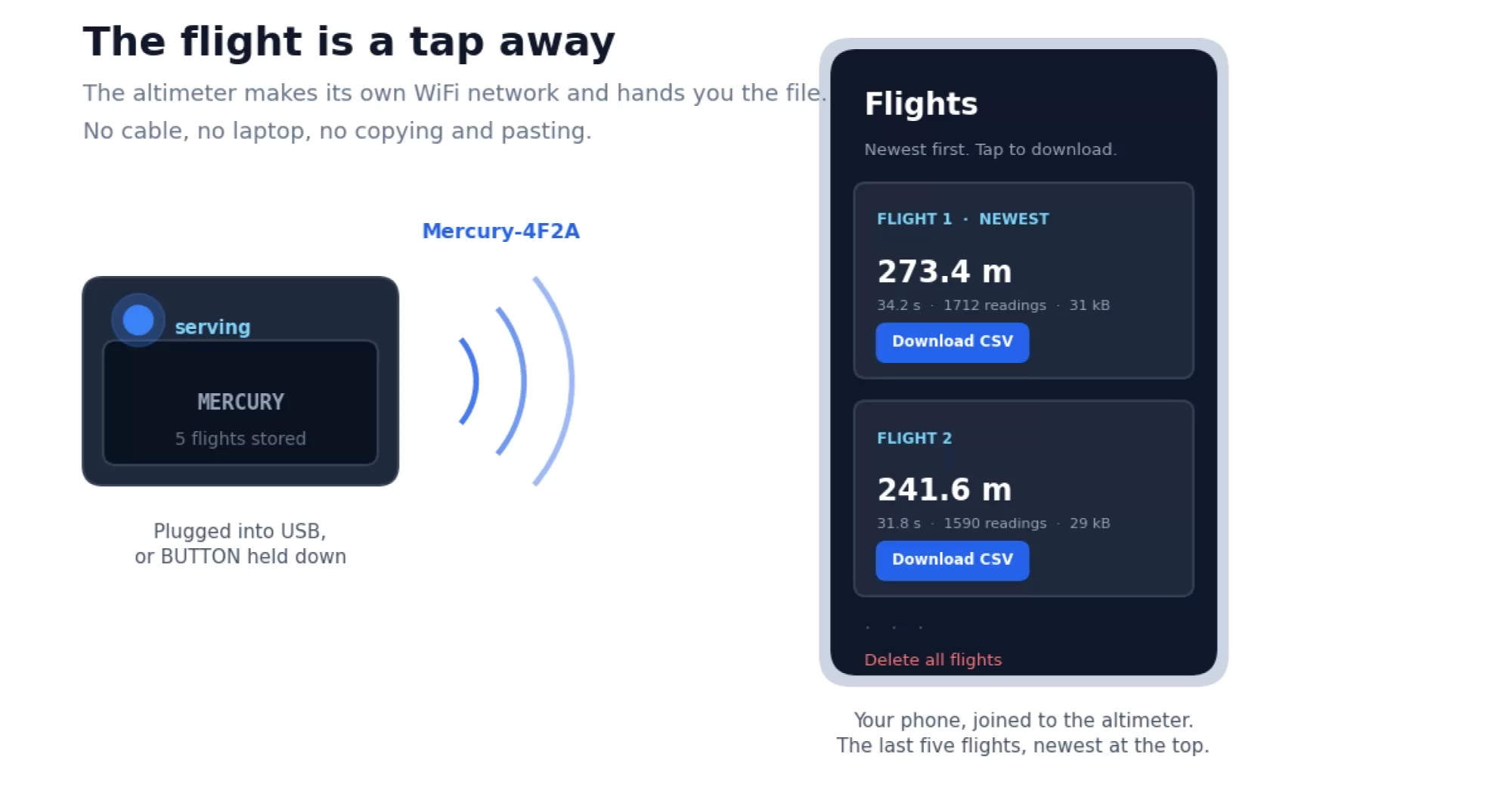
So this page fixes it. The altimeter records at fifty readings a second, saves each flight as a proper CSV file in the chip's flash, keeps the last five, and turns itself into a WiFi access point when you plug it in. Join the network on your phone, open a page, tap a flight, and the file is on your phone. Nothing else is involved: no router, no internet, no account, no app.
One board, two jobs
The sketch does two completely different things depending on how it was switched on, and it decides in the first few lines of setup().
if (digitalRead(USB_DETECT) == HIGH || digitalRead(BUTTON) == LOW) {
  startAccessPoint();
  state = STATE_WEB;
  return;
}
Plugged into USB, or holding the button down, means somebody is standing there with a phone or a laptop, so it comes up as an access point and offers the flights. On a battery, alone in a rocket, it records. GPIO1 on the Mercury goes high when a charging cable is present, which makes this a one line decision.
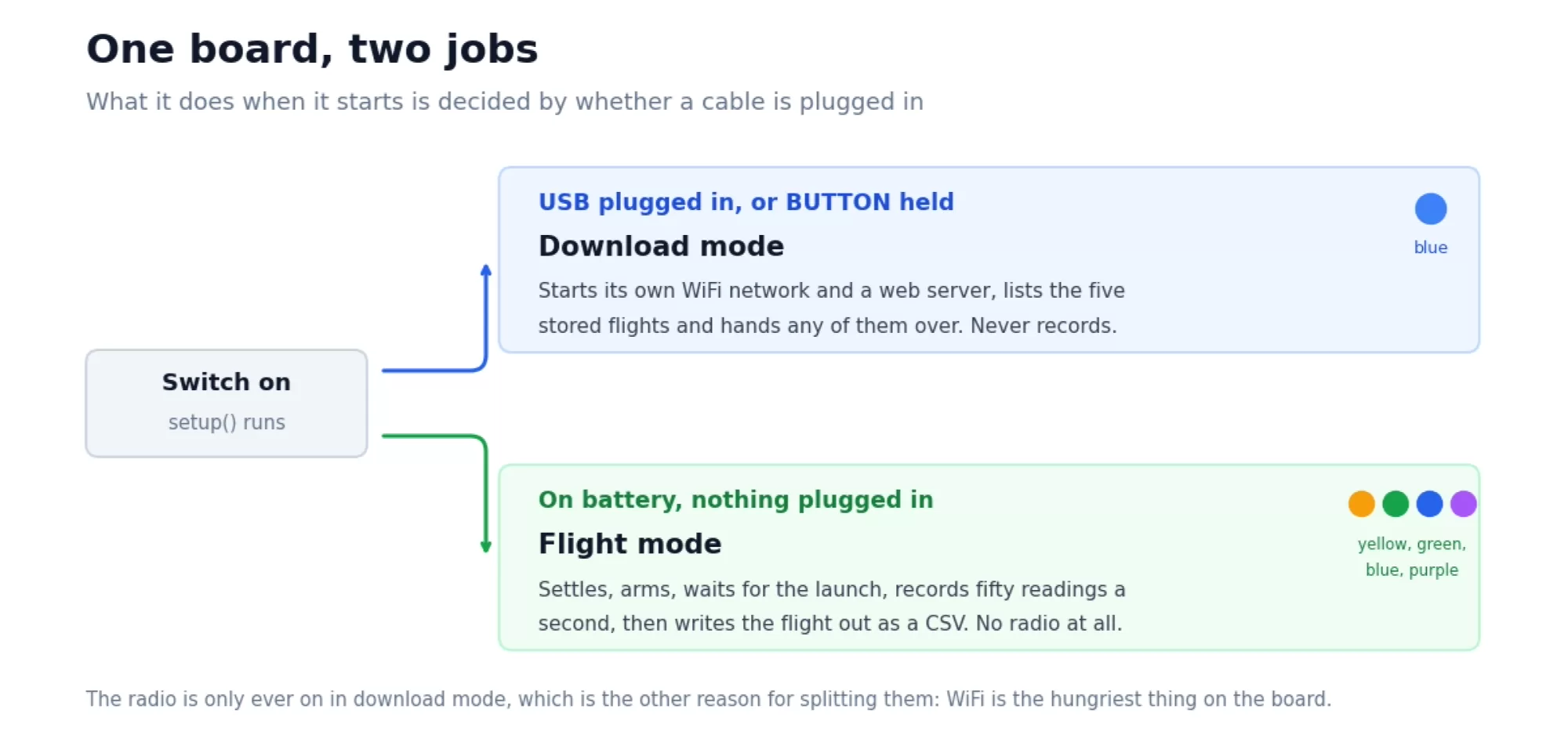
Why not do both at once? Because WiFi costs somewhere around a hundred milliamps, several times everything else put together, and because an access point nobody is connected to is a pure waste of a battery that has a rocket flight to get through. Turning the radio on only when a human is present is the single biggest thing you can do for battery life here.
A real filesystem
Projects 2 and 3 stored things in NVS, which is a settings store. It is excellent for ten apogees or one modest flight, and the wrong shape for five files of ninety kilobytes each. So this project uses LittleFS instead, which is a proper filesystem living in the flash, with files and names and sizes.
LittleFS.begin(true);                          // true means format if needed

File f = LittleFS.open("/flight1.csv", "w");   // "w" makes a new file
f.println("time_s,height_m");
f.print(1.42, 2); f.print(","); f.println(83.15, 2);
f.close();                                     // this is what flushes it out
If you have written a file in any other language this will look familiar, which is the point. The one thing worth pointing out is f.close(). Until you call it, some of what you have written is still sitting in a buffer rather than in the flash. Forget it and you get a file that is mysteriously short.
Where the space comes from
The partition scheme you have been using all along, "Default 4MB with spiffs", sets aside 1.5 MB for a filesystem. The name is historic: SPIFFS was the old filesystem, LittleFS replaced it, and the partition kept the name. At about 18 bytes a line, a hundred second flight at fifty readings a second comes to roughly 90 kB, so five of them use about a third of what is there.
Rotating five flights
Files are named /flight1.csv through /flight5.csv, with flight 1 always the newest. Making room for a new one means deleting the oldest and renaming the rest along one place:
LittleFS.remove("/flight5.csv");
LittleFS.rename("/flight4.csv", "/flight5.csv");
LittleFS.rename("/flight3.csv", "/flight4.csv");
...
It is exactly the same shuffle as the array of apogees in project 2, except these are files, and renaming one costs nothing because only the name moves. The data stays where it is.
The summary of each flight, the apogee, the duration and the number of readings, still goes into NVS rather than into the files. That is so the web page can list five flights without opening and reading five large files first. Small facts in the settings store, bulk data in the filesystem, is a division worth remembering.
Fifty readings a second
The sample rate goes from ten a second to fifty, which is where the boost phase starts to have real shape to it rather than being four dots and a guess. Two things had to change to allow it.
The first is memory. 5000 readings at 8 bytes each is 40 kB, which sounds like a lot until you remember the chip has 512 kB of RAM. It is still gathered in RAM during the flight and written out afterwards, for the reasons page 3 went into.
The second is the sensor. Since page 1 these sketches have used the same settings our own altimeters ship with: sixteen times oversampling on a BMP581, eight times on a BMP390, with the IIR filter on top. That is what makes the readings as quiet as they were on page 1, and a BMP581 still produces them fast enough for fifty a second.
Older BMP390 boards are the exception. The standby time between conversions comes down from 20 ms to the shortest the library offers, and even then a BMP390 at eight times oversampling is close to its limit at this rate. When it has nothing new to give, the loop skips that beat, and because every reading carries its own timestamp the file stays correct with slightly fewer rows in it.
Being a web server
The WebServer library does the hard part. You tell it which addresses you care about and which function should answer each one:
server.on("/", handleIndex);        // the flight list
server.on("/erase", handleErase);   // the delete all link
server.onNotFound(handleFile);      // anything else, try it as a filename
server.begin();
That last line is a small trick worth knowing. Rather than registering five separate addresses for five files, anything the server does not recognise gets looked for on the filesystem, and served if it is there. Add a sixth flight and it works with no extra code.
Files are sent with server.streamFile(), which reads from the flash and writes to the network in chunks rather than loading the whole thing into memory first. With 90 kB files and a few hundred kilobytes of RAM you would get away with the lazy approach, but it is a bad habit and the correct way is no harder.
One header makes the difference between a file that downloads and a wall of text in the browser:
server.sendHeader("Content-Disposition",
                  "attachment; filename=" + path.substring(1));
The sketch
This is the longest one in the series, but most of it you have already read. The settling, arming, launch detection, pre-launch buffer and time zero search are all straight out of page 3. What is new is at the bottom: the file handling, the access point, and the three functions that answer the browser.
/*
04_wifi_logger.ino
Mercury altimeter project 4: flight logs over WiFi
Part of the Altimeter Cloud "Build your own altimeter" series.
https://www.altimetercloud.com/po/rocketry-news/
Records the flight at fifty readings a second, saves it as a proper CSV file
in the chip's flash, and keeps the last five flights. Plug it into USB, or
hold the button while switching on, and it becomes a WiFi access point with
a web page you can open on your phone to download them.
No cable, no Serial Monitor, no copying and pasting a thousand lines out of
a terminal window at a launch site.
On the desk it triggers at 2 metres so you can test it by lifting it off
the table. Change LAUNCH_HEIGHT before you fly it.
Libraries needed (Arduino Library Manager):
Adafruit NeoPixel by Adafruit
Adafruit BMP5xx Library by Adafruit
BMP388_DEV by Martin Lindupp
WiFi, WebServer, LittleFS and Preferences come with the ESP32 board package.
Board settings: ESP32C6 Dev Module, USB CDC On Boot ENABLED, Flash Size 4MB,
Partition Scheme "Default 4MB with spiffs", CPU 160MHz.
The spiffs part of that name is historic. It is the area LittleFS uses.
*/
#include <Wire.h>
#include <WiFi.h> // making our own network
#include <WebServer.h> // answering web browsers
#include <LittleFS.h> // a real filesystem in the flash
#include <Preferences.h> // small settings, as in projects 2 and 3
#include <Adafruit_NeoPixel.h>
#include <Adafruit_BMP5xx.h>
#include <BMP388_DEV.h>
// ------------------------------------------------------------------
// The Mercury V1 pins. These are the same on every board.
// Using your own ESP32? Change these to the pins you wired.
// ------------------------------------------------------------------
#define LED_POWER 3 // Powers the status LED. Must be HIGH
#define LED_DATA 2 // Status LED data line
#define SENSOR_POWER 20 // Powers the pressure sensor and IMU. Must be HIGH
#define I2C_SDA 21 // I2C data
#define I2C_SCL 22 // I2C clock
#define OUTPUT_PIN 5 // Ejection charge output. Keep it LOW
#define BUTTON 9 // The BUTTON on the case. LOW when pressed
#define USB_DETECT 1 // HIGH when a charging cable is plugged in
#define BATTERY 0 // Reads half the battery voltage
#define BATTERY_GND 18 // Ground for the battery divider. Must be LOW
#define LED_BRIGHTNESS 4
// ------------------------------------------------------------------
// Settings you might want to change
// ------------------------------------------------------------------
#define WIFI_NAME "Mercury" // The network name gets the serial number added
#define WIFI_PASSWORD "rocketry" // At least 8 characters, or the AP will not start
#define LAUNCH_HEIGHT 2.0 // Metres. 2 for the desk, 25 to 40 in a rocket
#define SAMPLE_MS 20 // 20 ms between readings, so fifty a second
#define REF_SAMPLES 500 // 10 seconds of readings for the pad reference
#define LOG_MAX 5000 // 5000 readings at 50 Hz is 100 seconds
#define PRE_SAMPLES 150 // Readings kept from before the launch, so 3 s
#define MAX_FLIGHTS 5 // How many flights we keep on the filesystem
#define LANDED_DROP 1.0
#define LANDED_STILL_MS 5000
#define LANDED_BAND 0.5
#define FIND_HIGH 0.7 // Metres, step one of the launch time search
#define FIND_LOW 0.2 // Metres, step two
#define FIND_BACK_MS 400 // How much further back step two may look
// ------------------------------------------------------------------
// Things the sketch needs to remember
// ------------------------------------------------------------------
Adafruit_NeoPixel led(4, LED_DATA, NEO_GRB + NEO_KHZ800);
Adafruit_BMP5xx bmp581;
BMP388_DEV bmp390(Wire);
Preferences memory;
WebServer server(80); // 80 is the ordinary web port
bool have_bmp581 = false;
bool have_bmp390 = false;
float pressure_hpa = 0;
float temperature_c = 0;
float ref_buffer[REF_SAMPLES];
int ref_index = 0;
bool ref_ready = false;
float pad_hpa = 0;
float height = 0;
float apogee = 0;
// The flight, as it is being recorded. 5000 readings at 8 bytes each is 40 kB,
// which sounds like a lot until you remember the chip has 512 kB of RAM.
struct Sample {
uint32_t ms;
float m;
};
Sample flight[LOG_MAX];
int log_count = 0;
int log_zero = 0;
// A short summary of each stored flight. The readings themselves live in files
// on the filesystem, but these few numbers go in NVS so the web page can list
// every flight without opening and reading five large files first.
struct FlightInfo {
float apogee_m;
float seconds;
uint32_t samples;
};
FlightInfo info[MAX_FLIGHTS];
int flight_count = 0;
#define STATE_SETTLING 0
#define STATE_ARMED 1
#define STATE_FLYING 2
#define STATE_SAVING 3
#define STATE_DONE 4
#define STATE_WEB 5 // access point mode, not flying at all
int state = STATE_SETTLING;
unsigned long next_reading = 0;
unsigned long settle_ms = 0;
float settle_at = 0;
unsigned long blink_ms = 0;
// ==================================================================
// setup() runs once, when the board starts.
// ==================================================================
void setup() {
Serial.begin(115200);
pinMode(OUTPUT_PIN, OUTPUT);
digitalWrite(OUTPUT_PIN, LOW);
pinMode(LED_POWER, OUTPUT);
digitalWrite(LED_POWER, HIGH);
pinMode(SENSOR_POWER, OUTPUT);
digitalWrite(SENSOR_POWER, HIGH);
pinMode(BATTERY_GND, OUTPUT);
digitalWrite(BATTERY_GND, LOW);
pinMode(USB_DETECT, INPUT);
pinMode(BUTTON, INPUT_PULLUP);
led.begin();
setLed(255, 0, 0);
Wire.begin(I2C_SDA, I2C_SCL, 400000);
delay(100);
unsigned long start = millis();
while (!Serial && millis() - start < 2500) delay(10);
delay(250);
Serial.println();
Serial.println("Mercury altimeter project 4: WiFi flight logger");
// Start the filesystem. The true means "if there is nothing there, or what
// is there makes no sense, format it and carry on" rather than giving up.
// The first run after uploading takes a couple of seconds while it does so.
if (!LittleFS.begin(true)) {
Serial.println("Filesystem would not start!");
}
loadInfo();
startPressureSensor();
// Which job are we doing today?
//
// Plugged into USB, or holding the button down, means somebody is at a
// computer or has a phone in their hand, so we come up as an access point
// and offer the flights for download. On a battery, alone in a rocket, we
// record. One board, two entirely different jobs, decided by whether a
// cable is plugged in.
if (digitalRead(USB_DETECT) == HIGH || digitalRead(BUTTON) == LOW) {
startAccessPoint();
state = STATE_WEB;
return;
}
Serial.println();
Serial.print("Flight mode. Settling for ");
Serial.print((REF_SAMPLES * SAMPLE_MS) / 1000);
Serial.println(" seconds, keep it still.");
Serial.println("Unplug USB and restart to record. Plug in to download.");
setLed(255, 200, 0);
next_reading = millis();
}
// ==================================================================
// loop() runs over and over, for as long as the board is on.
// ==================================================================
void loop() {
// In access point mode there is no flying to do. All the loop does is
// answer browsers, which the WebServer library handles for us.
if (state == STATE_WEB) {
server.handleClient();
// A slow blue pulse so you can see across a field that it is serving
if (millis() - blink_ms > 1400) {
blink_ms = millis();
setLed(0, 60, 255);
} else if (millis() - blink_ms > 120) {
setLed(0, 0, 0);
}
return;
}
// Fifty readings a second, timed against the clock.
if (millis() < next_reading) return;
next_reading = millis() + SAMPLE_MS;
if (!readSensor()) return;
ref_buffer[ref_index] = pressure_hpa;
ref_index = ref_index + 1;
if (ref_index >= REF_SAMPLES) {
ref_index = 0;
ref_ready = true;
}
// ---------------- SETTLING ----------------
if (state == STATE_SETTLING) {
if (ref_ready) {
state = STATE_ARMED;
Serial.println("Armed. Waiting for launch.");
}
return;
}
if (state == STATE_ARMED) pad_hpa = padPressure();
height = heightAbove(pad_hpa, pressure_hpa, temperature_c);
// ---------------- ARMED ----------------
if (state == STATE_ARMED) {
if (millis() - blink_ms > 2000) {
blink_ms = millis();
setLed(0, 255, 0);
} else if (millis() - blink_ms > 60) {
setLed(0, 0, 0);
}
if (height > LAUNCH_HEIGHT) {
startLog();
state = STATE_FLYING;
apogee = height;
settle_at = height;
settle_ms = millis();
setLed(0, 0, 255);
Serial.println("LAUNCH! Recording.");
}
return;
}
// ---------------- FLYING ----------------
if (state == STATE_FLYING) {
addToLog(millis(), height);
if (height > apogee) apogee = height;
if (fabs(height - settle_at) > LANDED_BAND) {
settle_at = height;
settle_ms = millis();
}
bool stopped = (millis() - settle_ms) > LANDED_STILL_MS;
bool descended = (apogee - height) > LANDED_DROP;
bool full = (log_count >= LOG_MAX);
if ((stopped && descended) || full) {
state = STATE_SAVING; // the writing happens next time round
}
return;
}
// ---------------- SAVING ----------------
if (state == STATE_SAVING) {
findTimeZero();
setLed(255, 255, 255); // white while it writes
Serial.println();
Serial.print("Landed. Apogee ");
Serial.print(apogee, 2);
Serial.print(" m from ");
Serial.print(log_count);
Serial.println(" readings. Writing the file.");
saveFlightFile();
Serial.print("Saved as /flight1.csv, ");
Serial.print(fileSize("/flight1.csv"));
Serial.println(" bytes. Plug in USB to download it.");
blinkLed(255, 255, 255, 3);
state = STATE_DONE;
blink_ms = millis();
return;
}
// ---------------- DONE ----------------
if (state == STATE_DONE) {
// A short purple flash every three seconds. Flashing rather than staying
// lit is easier to spot across a field and far kinder to the battery: the
// LED is on for 70 ms in every 3000 instead of continuously, and on this
// board the LED draws more than the processor does.
if (millis() - blink_ms > 3000) {
blink_ms = millis();
setLed(200, 0, 255);
} else if (millis() - blink_ms > 70) {
setLed(0, 0, 0);
}
return; // and stop reading the sensor, there is nothing left to record
}
}
// ==================================================================
// The functions setup() and loop() use.
// ==================================================================
void setLed(int red, int green, int blue) {
for (int i = 0; i < 4; i++) {
led.setPixelColor(i, led.Color(red / LED_BRIGHTNESS,
green / LED_BRIGHTNESS,
blue / LED_BRIGHTNESS));
}
led.show();
}
void blinkLed(int red, int green, int blue, int times) {
for (int i = 0; i < times; i++) {
setLed(red, green, blue);
delay(120);
setLed(0, 0, 0);
delay(180);
}
}
bool deviceAt(byte address) {
Wire.beginTransmission(address);
return Wire.endTransmission() == 0;
}
// Mercury boards carry one of two pressure sensors, at different addresses.
// BMP581 at 0x46 or 0x47 BMP390 at 0x76 or 0x77
//
// Both are set up a little differently from the earlier projects. At fifty
// readings a second there is only 20 ms to play with, so the oversampling
// comes down from eight to four. Oversampling is the sensor taking several
// measurements internally and averaging them: more of it means less noise but
// a slower answer. Speed and quietness pull against each other, and this is
// the trade you make when you want a faster log.
void startPressureSensor() {
if (deviceAt(0x46) || deviceAt(0x47)) {
Serial.println("Found a BMP581");
if (!bmp581.begin(BMP5XX_ALTERNATIVE_ADDRESS, &Wire)) {
bmp581.begin(BMP5XX_DEFAULT_ADDRESS, &Wire);
}
// Settings taken from our own altimeters. Sixteen times oversampling on
// pressure, which is what a Mercury with a BMP581 ships with, and IIR
// filter coefficient 7. Oversampling makes the sensor take several
// measurements internally and average them before handing you an answer;
// the IIR filter then smooths the stream of answers. Together they are
// what makes the readings as quiet as they were on page 1.
bmp581.setTemperatureOversampling(BMP5XX_OVERSAMPLING_1X);
bmp581.setPressureOversampling(BMP5XX_OVERSAMPLING_16X);
bmp581.setIIRFilterCoeff(BMP5XX_IIR_FILTER_COEFF_7);
bmp581.setOutputDataRate(BMP5XX_ODR_80_HZ);
bmp581.setPowerMode(BMP5XX_POWERMODE_NORMAL);
bmp581.enablePressure(true);
have_bmp581 = true;
} else if (deviceAt(0x76) || deviceAt(0x77)) {
Serial.println("Found a BMP390");
// Eight times oversampling on pressure, which is what a Mercury with a
// BMP390 ships with, and the matching IIR filter. OVERSAMPLING_SKIP on
// the temperature is a misleading name inherited from an older sensor:
// on a BMP390 it means one sample, not no sample.
// The shortest standby the library offers, because this project takes
// fifty readings a second. At 20 ms an older board cannot keep up, and
// the loop simply skips the beats it misses.
bmp390.begin(NORMAL_MODE, OVERSAMPLING_X8, OVERSAMPLING_SKIP,
IIR_FILTER_8, TIME_STANDBY_5MS);
bmp390.startNormalConversion();
have_bmp390 = true;
} else {
Serial.println("No pressure sensor found!");
}
}
bool readSensor() {
if (have_bmp581) {
if (!bmp581.performReading()) return false;
pressure_hpa = bmp581.pressure;
temperature_c = bmp581.temperature;
return true;
}
if (have_bmp390) {
return bmp390.getTempPres(temperature_c, pressure_hpa);
}
return false;
}
float heightAbove(float reference, float hpa, float temp) {
if (reference <= 0) return 0;
return ((temp + 273.15) / 0.0065) * (1.0 - pow(hpa / reference, 0.190266669));
}
float padPressure() {
int wanted = REF_SAMPLES / 2;
float total = 0;
for (int i = 0; i < wanted; i++) {
total = total + ref_buffer[(ref_index + i) % REF_SAMPLES];
}
return total / wanted;
}
// Fill the start of the log with the three seconds before we noticed anything,
// converted out of the pressure ring buffer.
void startLog() {
log_count = 0;
uint32_t now = millis();
for (int i = PRE_SAMPLES; i >= 1; i--) {
int slot = (ref_index - i + REF_SAMPLES) % REF_SAMPLES;
addToLog(now - (uint32_t)((i - 1) * SAMPLE_MS),
heightAbove(pad_hpa, ref_buffer[slot], temperature_c));
}
}
void addToLog(uint32_t when, float metres) {
if (log_count >= LOG_MAX) return;
flight[log_count].ms = when;
flight[log_count].m = metres;
log_count++;
}
// Work out which reading is really the moment of launch, by walking backwards
// through the readings we kept from before we noticed it. Page 3 has the long
// explanation of why this is needed.
void findTimeZero() {
if (log_count <= 0) { log_zero = 0; return; }
int i = PRE_SAMPLES - 1;
if (i >= log_count) i = log_count - 1;
while (i > 0 && flight[i].m > FIND_HIGH) i--;
int steps_back = FIND_BACK_MS / SAMPLE_MS;
int limit = i - steps_back;
if (limit < 0) limit = 0;
while (i > limit && flight[i].m > FIND_LOW) i--;
log_zero = i;
}
float secondsFromLaunch(int i) {
return ((long)flight[i].ms - (long)flight[log_zero].ms) / 1000.0;
}
// ---- Files -------------------------------------------------------
// Flights are called /flight1.csv to /flight5.csv, with flight1 always the
// newest. Making room for a new one means deleting the oldest and shuffling
// the rest along, exactly like the array of apogees in project 2, except
// these are files and get renamed rather than copied.
void rotateFiles() {
String oldest = "/flight" + String(MAX_FLIGHTS) + ".csv";
if (LittleFS.exists(oldest)) LittleFS.remove(oldest);
for (int i = MAX_FLIGHTS - 1; i >= 1; i--) {
String from = "/flight" + String(i) + ".csv";
String to = "/flight" + String(i + 1) + ".csv";
if (LittleFS.exists(from)) LittleFS.rename(from, to);
}
for (int i = MAX_FLIGHTS - 1; i >= 1; i--) {
info[i] = info[i - 1];
}
if (flight_count < MAX_FLIGHTS) flight_count++;
}
// Write the flight we have just recorded out as a CSV file.
void saveFlightFile() {
rotateFiles();
File f = LittleFS.open("/flight1.csv", "w"); // "w" means make a new one
if (!f) {
Serial.println("Could not open the file for writing!");
return;
}
f.println("time_s,height_m");
for (int i = 0; i < log_count; i++) {
f.print(secondsFromLaunch(i), 2);
f.print(",");
f.println(flight[i].m, 2);
}
f.close(); // always close it, this is what actually flushes it out
info[0].apogee_m = apogee;
info[0].seconds = secondsFromLaunch(log_count - 1);
info[0].samples = log_count;
saveInfo();
// Check the file is really there and really has something in it, rather
// than assuming. A flight you think you have and do not is worse than one
// you know you lost.
int size = fileSize("/flight1.csv");
if (size < 20) {
Serial.println("WARNING: the file did not write properly.");
flight_count = 0;
saveInfo();
return;
}
Serial.print("Wrote /flight1.csv, ");
Serial.print(fileSize("/flight1.csv"));
Serial.println(" bytes");
}
int fileSize(String path) {
File f = LittleFS.open(path, "r");
if (!f) return 0;
int n = f.size();
f.close();
return n;
}
void loadInfo() {
memory.begin("wifilog", true);
flight_count = memory.getInt("count", 0);
if (flight_count > MAX_FLIGHTS) flight_count = MAX_FLIGHTS;
if (flight_count < 0) flight_count = 0;
// If the summaries did not come back at the size we asked for, they are not
// to be trusted, so treat it as having none rather than listing nonsense.
size_t got = memory.getBytes("info", info, sizeof(info));
if (got != sizeof(info)) {
flight_count = 0;
for (int i = 0; i < MAX_FLIGHTS; i++) {
info[i].apogee_m = 0;
info[i].seconds = 0;
info[i].samples = 0;
}
}
memory.end();
// The summaries live in NVS and the flights live in files, so the two can
// disagree if one was wiped without the other. Believe the files.
int real = 0;
for (int i = 0; i < flight_count; i++) {
if (LittleFS.exists("/flight" + String(i + 1) + ".csv")) real++;
else break;
}
flight_count = real;
}
void saveInfo() {
memory.begin("wifilog", false);
memory.putBytes("info", info, sizeof(info));
memory.putInt("count", flight_count);
memory.end();
}
// ---- WiFi and the web page ---------------------------------------
// Bring up our own network. Nothing else is involved: no router, no internet,
// no password to your home WiFi. The board becomes the network, your phone
// joins it, and everything happens between the two of them.
void startAccessPoint() {
// Put the last four digits of the chip's own address into the name, so two
// altimeters side by side at a launch do not both appear as "Mercury".
WiFi.mode(WIFI_AP);
String mac = WiFi.softAPmacAddress();
mac.replace(":", "");
String name = String(WIFI_NAME) + "-" + mac.substring(8);
WiFi.softAP(name.c_str(), WIFI_PASSWORD);
delay(300);
server.on("/", handleIndex);
server.on("/erase", handleErase);
server.onNotFound(handleFile); // anything else is treated as a filename
server.begin();
Serial.println();
Serial.println("Download mode.");
Serial.print(" Join the WiFi network : ");
Serial.println(name);
Serial.print(" Password : ");
Serial.println(WIFI_PASSWORD);
Serial.print(" Then open : http://");
Serial.println(WiFi.softAPIP());
Serial.print(" Flights stored : ");
Serial.println(flight_count);
setLed(0, 60, 255);
}
// The page itself. It is built up as one long string and handed to the
// browser in a single reply. Keeping the styling inline means there is no
// second request for a stylesheet, which keeps all of this in one function.
void handleIndex() {
String p;
p.reserve(4000); // ask for the memory once rather than growing slowly
p += "<!DOCTYPE html><html><head><meta charset='utf-8'>";
p += "<meta name='viewport' content='width=device-width,initial-scale=1'>";
p += "<title>Mercury flights</title><style>";
p += "body{font-family:system-ui,sans-serif;margin:0;background:#0f172a;color:#e2e8f0;}";
p += ".w{max-width:640px;margin:0 auto;padding:26px 18px 60px;}";
p += "h1{font-size:1.5em;margin:0 0 4px;}";
p += ".s{color:#94a3b8;font-size:0.9em;margin:0 0 24px;}";
p += ".f{background:#1e293b;border:1px solid #334155;border-radius:12px;";
p += "padding:16px 18px;margin:0 0 14px;}";
p += ".n{font-size:0.78em;color:#7dd3fc;letter-spacing:.05em;text-transform:uppercase;}";
p += ".a{font-size:1.7em;font-weight:700;margin:6px 0;}";
p += ".d{color:#94a3b8;font-size:0.88em;}";
p += "a.b{display:inline-block;margin-top:12px;background:#2563eb;color:#fff;";
p += "padding:9px 16px;border-radius:8px;text-decoration:none;font-weight:600;}";
p += "a.e{color:#f87171;font-size:0.85em;}";
p += "</style></head><body><div class='w'>";
p += "<h1>Flights</h1>";
p += "<p class='s'>Newest first. Tap to download the CSV.</p>";
if (flight_count == 0) {
p += "<div class='f'>Nothing recorded yet.</div>";
}
for (int i = 0; i < flight_count; i++) {
String path = "/flight" + String(i + 1) + ".csv";
if (!LittleFS.exists(path)) continue;
p += "<div class='f'>";
p += "<div class='n'>Flight " + String(i + 1);
if (i == 0) p += " · newest";
p += "</div>";
p += "<div class='a'>" + String(info[i].apogee_m, 1) + " m</div>";
p += "<div class='d'>" + String(info[i].seconds, 1) + " s · ";
p += String(info[i].samples) + " readings · ";
p += String(fileSize(path) / 1024) + " kB</div>";
p += "<a class='b' href='" + path + "'>Download CSV</a>";
p += "</div>";
}
if (flight_count > 0) {
p += "<p><a class='e' href='/erase'>Delete all flights</a></p>";
}
p += "<p class='s'>Battery ";
p += String(analogReadMilliVolts(BATTERY) * 2 / 1000.0, 2);
p += " V</p></div></body></html>";
server.send(200, "text/html", p);
}
// Anything that is not the index is looked for as a file. streamFile sends it
// straight from the flash to the browser without loading it into memory
// first, which matters when the file is bigger than the memory.
void handleFile() {
String path = server.uri();
if (LittleFS.exists(path)) {
File f = LittleFS.open(path, "r");
// This header is what makes the browser save the file rather than show it
server.sendHeader("Content-Disposition",
"attachment; filename=" + path.substring(1));
server.streamFile(f, "text/csv");
f.close();
return;
}
server.send(404, "text/plain", "Not found");
}
void handleErase() {
for (int i = 1; i <= MAX_FLIGHTS; i++) {
String path = "/flight" + String(i) + ".csv";
if (LittleFS.exists(path)) LittleFS.remove(path);
}
flight_count = 0;
saveInfo();
server.sendHeader("Location", "/");
server.send(303, "text/plain", ""); // 303 sends the browser back to the index
}Trying it
First run, plugged in, it comes up in download mode and tells you what to do:
Mercury altimeter project 4: WiFi flight logger
Found a BMP581

Download mode.
  Join the WiFi network : Mercury-4F2A
  Password              : rocketry
  Then open             : http://192.168.4.1
  Flights stored        : 0
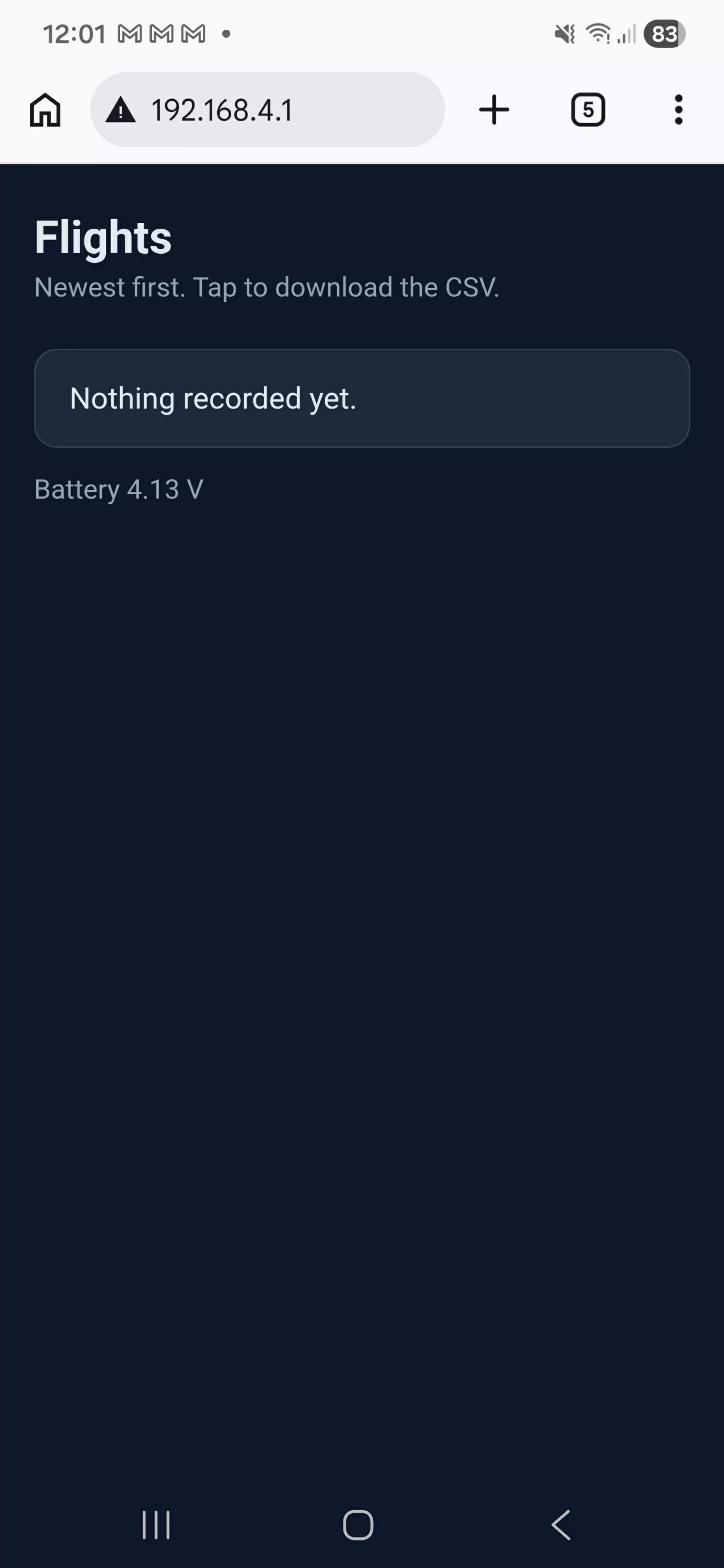
Join that network on your phone and open the address. You will get an empty list, which is correct, because you have not flown anything yet.
- Unplug the USB cable so it runs on the battery. It restarts in flight mode.
- Yellow for ten seconds while it settles, then winking green.
- Lift it a couple of metres, hold it up, then put it down and leave it alone.
- White while it writes the file, three flashes, then purple.
- Plug the USB back in. It restarts in download mode.
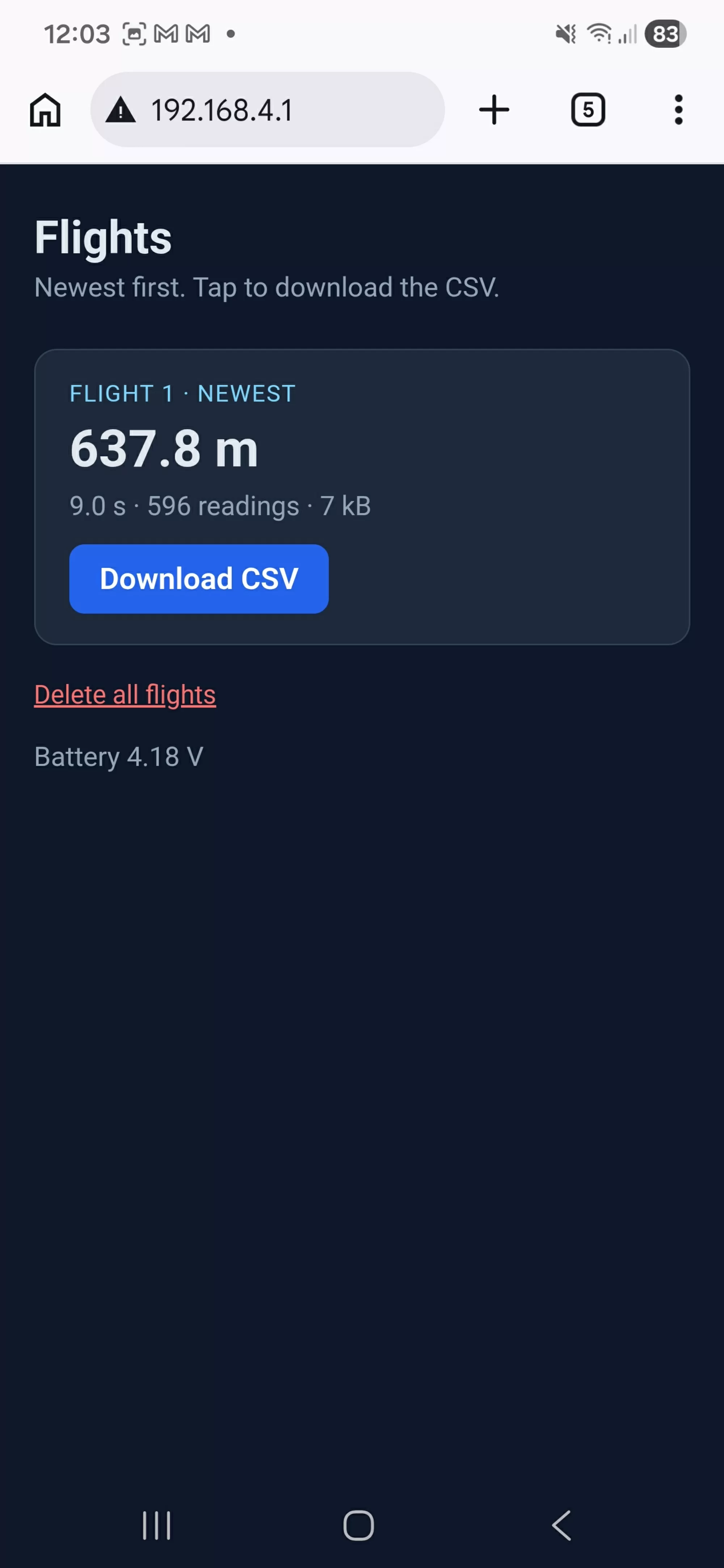
- Join the network again, refresh the page, and your flight is there with a download button.
Your phone will very likely complain that this network has no internet, and offer to switch back to mobile data. Tell it to stay connected. Android in particular is persistent about this. It is not a fault with the altimeter, it is your phone being helpful about a network that genuinely does not go anywhere.
If something goes wrong
| What you see | What to do |
| The network never appears | The password has to be at least eight characters or the access point silently refuses to start. Check WIFI_PASSWORD. |
| The page will not load | Your phone has probably dropped back to mobile data. Reconnect and tell it to stay. Try the address by hand: http://192.168.4.1 |
| It always comes up in download mode | USB_DETECT reads high whenever a cable is in, including a charge only one. Unplug it completely to record. |
| Tapping download shows the numbers instead of saving a file | Some mobile browsers ignore the Content-Disposition header. Use share or save from the browser menu, or open it on a laptop. |
| The file is shorter than the flight | Something returned before f.close() ran. Nothing is really written until the file is closed. |
| The first boot after uploading takes ages | LittleFS is formatting the partition because it has never been used. It happens once. |
Things to try
- Add a page that charts the flight in the browser, rather than only offering the file. A few lines of SVG will do it.
- Put the flight date in the filename by asking your phone for the time when it connects.
- Serve a settings page, so the launch height can be changed without recompiling.
- Have the altimeter join your home WiFi instead of making its own, and upload flights by itself when it gets back in range.
What you still cannot see is what the rocket was doing, as opposed to where it was. Pressure tells you height, and nothing about which way up you were, how hard the motor pushed, or whether the airframe was spinning. The Mercury has an accelerometer and a gyroscope sitting on the same I2C bus, unused so far. Page 5 puts them in the file.