Distance
Choisissez l’unité de distance: Mètres(m), Pieds(ft), Miles(mi) ou Kilomètres(km)
Vitesse
Choisissez l’unité de vitesse: m/s, ft/s, mph ou km/h
Accélération
Choisissez l’unité d’accélération: m/s² ou G
Vol 2917

Flight 2917

Nano V1 Rev 3 · firmware 1.65Secure logSecure logThe altimeter signed this log and it passed verification on upload, so the data is unchanged since the device wrote it.Signatures use Ed25519, which no current technology can forge.
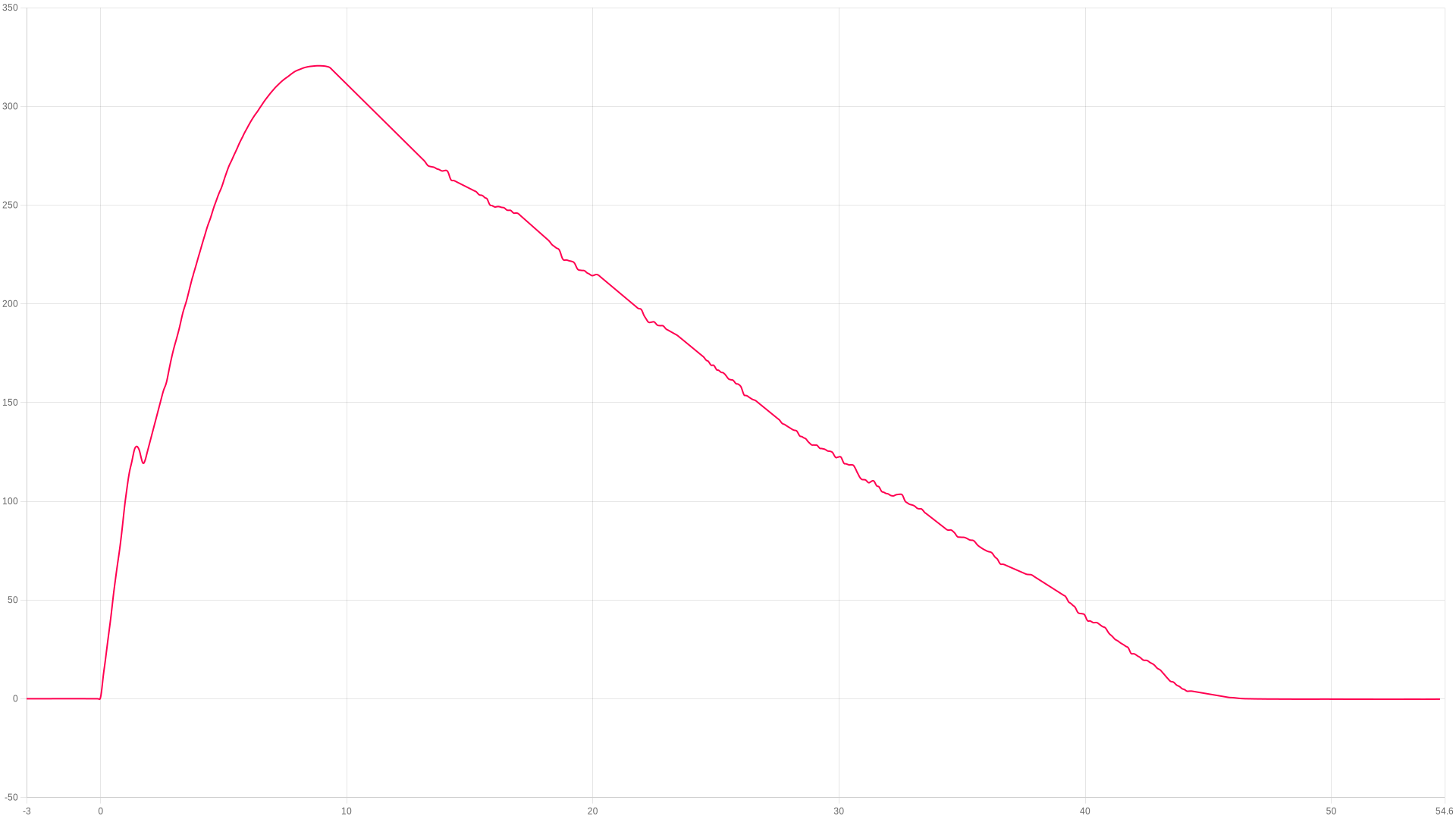
Apogée
320.61m
8.86 s after launch
Max. montée
107.7m/s
peak ascent
Max. pendant combustion
0G
during the burn
Atterrissage
45.72s
touchdown 6.34 m/s
ZOOM TO
s
s
Afficher événements
Ajuster temp. & pression ?
Image
Zoom
Cliquez-glissez ou pincez sur mobile
Comparer un vol ?
Résumé du vol
Altitude
Apogée
320.61 Mètres
Temps jusqu’apogée
8.85 seconds
Vitesse
Max. montée
107.69 m/s
Max. descente
-25.5 m/s
Temps
Atterrissage
45.71 seconds
Durée totale enregistrement
61.989 seconds
Notes utilisateur
Aucune note
Ajoutez cet appareil à votre compte pour modifier
Vidéo Youtube
Aucune vidéo
Ajoutez cet appareil à votre compte pour modifier
Images du vol 0
Aucune image
Moteurs du vol
Aucun moteur ajouté à ce vol
Ajoutez cet appareil à votre compte pour modifier
Fusée associée
Aucune fusée associée à ce vol

Linked flights

Connect flights that belong together: a second altimeter flown in the same rocket, or the same rocket flown again. Linked flights appear on each other’s pages.

No linked flights yet.

Site de lancement, date & heure

Cliquez sur la carte pour marquer votre site de lancement. Basculez entre vue carte et satellite.

Imagery © Esri, Maxar, Earthstar Geographics

Cliquez sur la carte · Glissez pour ajuster

No launch site has been set for this flight.

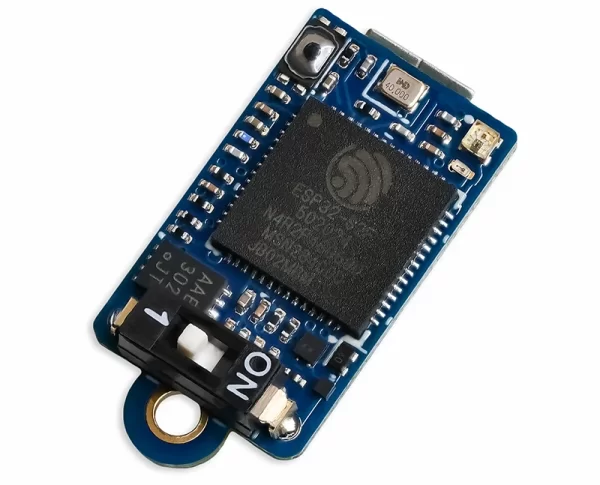
Nano V1
Revision 3
Nano V1
Ce vol a été effectué sur un Nano V1.
The hardware
Version matérielRev 3
Version logiciel1.65
Dernière connexion13/09/26-21:48:59
Capteur pressionBosch BMP 390

Flights from this altimeter

No other flights yet. This will fill up as you fly.

Settings, as they were for this flight

Paramètres généraux
Pression prévue
i
Set this to your local forecast pressure at sea level. This will offer you slightly improved accuracty for your flight, although it's not 100% essential every little helps!

Xcweather.co.uk is a decent place to grab pressures from for your location and time.
1013.2 mbar
Détection lancement
i
This is the altitude above the launch pad altitude where the altimeter will trigger itself into recording / flight mode.

The altimeter keeps a constant average of the pressure while waiting for launch, it uses a simple algorithm and the pre-flight buffers to do this. The most recent 120 samples (~4 seconds) are ignored so your pre-trigger altitude won't effect the ground baseline.

For almost all uses we suggest keeping this on the 25 Meter (~82 feet) default settings. If you want to test your altimeter by throwing it in the air, or are planning a very low flight you may want to lower the setting.
30 meters
Ratio échantillonnage
i
The altimeter runs at 50Hz however you can record every sample or every X samples in order to extend the log time. For example if you set the ratio to 1 it will save 1:1 samples, or if you set it to 3 it will save 1 in 3 samples.
1:1:1 (50Hz)
Max. échantillons
i
This is the maximum samples the altimeter will log per flight. When it reaches this amount it will stop and save the recording.
38000
Arrêt enregistrement
i
This setting is how the altimeter decides to stop recording. You can choose either 450 (~9s) or 900 (~18s) samples stable or it will record until the max samples limit unless you press the BUTTON in Manual stop mode.

The samples stable method waits for the devices altitude not to change for the set number of samples. This is defined by not changing by more than +/- 1.0 meters for 98% of the samples, it's a reliable method to stop the recording after landing within 8-10 seconds (300 sample) or 16-20 seconds (600 sample).
Auto: 8s stable altitude
Suréchantillonnage
i
Oversampling is a internal setting of the BMP 390 pressure sensor. It is how many samples are taken for each reading. By taking multiple samples for each pressure reading the altimeter reduces noise and increases the resolution of the output.

The sensor can run at 50 samples per second in 4X mode, so we suggest leaving it in this mode as it will offer the highest accuracy.
8x Oversampling
Filtre IIR
i
The IIR filter is another internal sensor for the BMP390 pressure sensor. It is a Infinite impulse response filter used to enhance pressure measurement accuracy by reducing noise. It's primarily for smoothing out rapid pressure changes.

We suggest not setting this too high as it will cause delay to changes in altitude if set very high.
COEFF 7
Filtre pression
i
This filter is a software Kalman filter that runs on the altimeters processor.

The Kalman filter uses a prediction step based on a system model and then a correction step using new measurements to refine its estimate, it creates accurate most certain results from data with noise in it.
TruePath
Sample speed
i
The sample rate of the altimeter's sensors. 50Hz takes 50 samples per second, 100Hz takes 100 samples per second for higher resolution data.
50 Hz
Hybrid mode
i
When enabled, the altimeter records at full speed during ascent then switches to half speed after apogee to extend recording time during descent.
Disabled
Verrouillage lancement
i
When enabled, the altimeter locks out recording for a set period after power on to prevent false triggering during setup.
DISABLED
Température statique
i
A fixed temperature value used for altitude calculation when the external temperature sensor is disabled or not connected.
15 °C

Files

Where the altimeter signs its log, the file carries that signature and a tick beside it. A tick means the data is unchanged since the device wrote it, which is what a record claim needs.
CSV
2917.csv ✓ SIGNED
The log as columns of text. Opens in a spreadsheet, and in every simulator that reads flight data.
126 KB
LOG
2917.aclz ✓ SIGNED
The altimeter's own compressed log, exactly as the device wrote it. This is the file to keep for a record claim.
11 KB
Adjusted CSV2904 recalculated in your browser
The log recomputed for your own sea-level pressure and temperature. Columns: time, altitude as recorded and adjusted, raw altitude as recorded and adjusted, pressure.

This file is built here from the signed log, so it carries no signature of its own. Anyone verifying a claim should be sent to the flight page and build their own from the original.

Vol
Commentaires
Connectez-vous pour commenter.