The Mercury always enters flight mode when it is turned on, as long as it's not connected to a USB-C cable.
If it has a USB-C cable connected and power available via the USB it will enter WiFi mode instead.
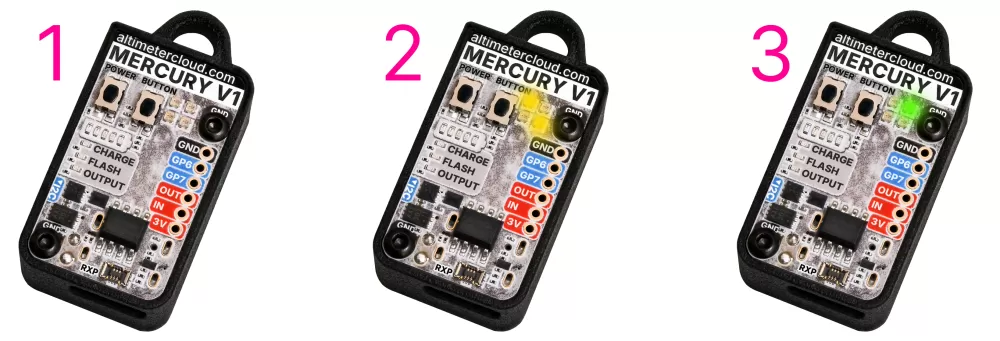
Step 1: Turn the Mercury on, press the power button once. After about 8 seconds it will enter step 2.
Step 2: Wait for the Mercury to stop its yellow status calibration for around 8 seconds.
Step 3: The Mercury will now flash one status LED green every 4 or 8 seconds depending on the mode to indicate it's ready to fly.
Default settings
The Mercury's default settings require a rocket to reach 25 meters before launch is triggered. This is of course fine for almost all rocket flights, if you want to adjust your settings please see the relevant settings on the menu to the left to do so.
How is launch detected?
The Mercury maintains a pre-flight average pressure that it constantly updates while waiting for launch. This ensures atmospheric changes, or moving your rocket somewhere after turning on the altimeter won't affect its absolute accuracy when determining your flight altitudes.
When a rocket sees its altitude rise above the launch detect value in the settings it will trigger recording. It will then look back in its pre-recording buffer to determine the actual launch point when it was still on the pad.
The Launch ALP setting may also be of interest, this prevents the rocket from detecting launches accidentally.
The Mercury will trigger launch when it meets the following conditions.
The Mercury will trigger launch when it meets the following conditions.
Tips & considerations
Keep an eye on your battery charge. Revisions 2 onwards have a battery bar on the board which will by default blink every 8 seconds the current battery state. Your altimeter can sit waiting for launch for over 6 hours so even half a charge should suffice for most uses. Don't forget you can charge your altimeter from your mobile phone using the supplier USB-C to USB-C cable and it will only use a fraction of a percent of your phone's battery to do so.
If you have used WiFi mode just before flying your altimeter will have warmed up a little bit. This will slightly affect the accuracy of your altitude readings until the board has cooled down. Ideally we suggest waiting 5 to 10 minutes after using configuration/WiFi mode before flying for the very best accuracy.
If you configure one of your WiFi options to your mobile hotspot, you can connect the USB-C cable to your phone and turn on your Mercury to enter WiFi mode. It will then upload your flights and allow you to configure from the Altimeter Cloud website in the field with ease.
Don't forget your altimeter needs to breathe. You should make 3 or more holes in your rocket around where the altimeter is installed so it can see the changing pressure outside of your rocket. We have a vent hole size calculator in the menu on the left or in the tools section on the Altimeter Cloud website.
Be careful when removing your nosecone or electronics bay ends. If your altimeter is on this causes a drop in pressure (altitude rise) that the altimeter may trigger itself with depending on your settings.
Always ensure your altimeter is still on in flight mode after re-entering your rocket since turning it on.