New Nano altimeter firmware (v1.60)
We've released a new firmware for the Nano altimeter.
This is mostly a suite of huge improvements but also resolves a few bugs.
We strongly suggest you update to this new firmware.
You can do so from our firmware update page here.
Highlights (more detail below)
- Bug causing late burnout detection fixed.
- Drag compensated acceleration calculated.
- Up to 400Hz logging now supported.
- Truepath filter updated from version 1.0 to 1.2
- Burnout detection now uses drag compensated acceleration giving highly accurate true burnout points.
- Multiple stage ignition and burnouts greatly improved.
- ACLZ v2 log format, giving 38000 samples per flight and raw altitude and pressure (increase from 24000 previously)
- Velocity fusion instead of pressure only velocity
- Pre-flight logged data extended to at least 8 seconds up from 4 seconds
- Launch detection safety improved with the additional slew rate protection on the pad altitude and increased validation times.
- Improved IMU to pressure syncronisation
- Recovery buffer expanded from 4800 to 7200 samples. (1:5 samples recovered up to 38,000 samples)
- Two way communication via USB to download logs and apply settings. Enabling new cloud webpage for configuring settings or uploading logs with ease.
- Bug fixed where the unit would wake up instantly from going in to deep sleep after a flight (oops!)
- Altitude repair via acceleration comparison for early flight pressure errors causing altitude corruption.
- Altimeter signs a converted CSV or ACLZ log regardless of chosen format to enable later exact conversion between formats on the website without exposing the signing key.
Bug causing late burnout detection
This was caused by the fact launch detection can take up to 2500ms (typically faster) to validate. The burnout detection system then only ran from this point and missed burnout that happened before it.
The solution is to look back at the saved log for burnout(s) should burnout have already occured when launch is detected.
Drag compensated acceleration & burnout implications
One of the main issues we noticed with burnout detection is on higher speed flights. Working out when thrust had actually stopped in a crude form simply looks for a change in the direction of acceleration.
This is though really a measure of when drag exceeds thrust, and not when thrust has ceased.
By utilising the coast phase of a flight we are able to estimate a drag coefficient and the drag force on the rocket, enabling a much more accurate burnout detection and the amount of thrust currently applied to the rocket.
The result is a clear trace of thrust or not that is easy to determine burn and burnout points from.
For the Nano this fits perfectly with it's post processing of the flight data when the log is saved. For live detection, other altimeters still rely on the sign change and then refine that time when coasting is occuring.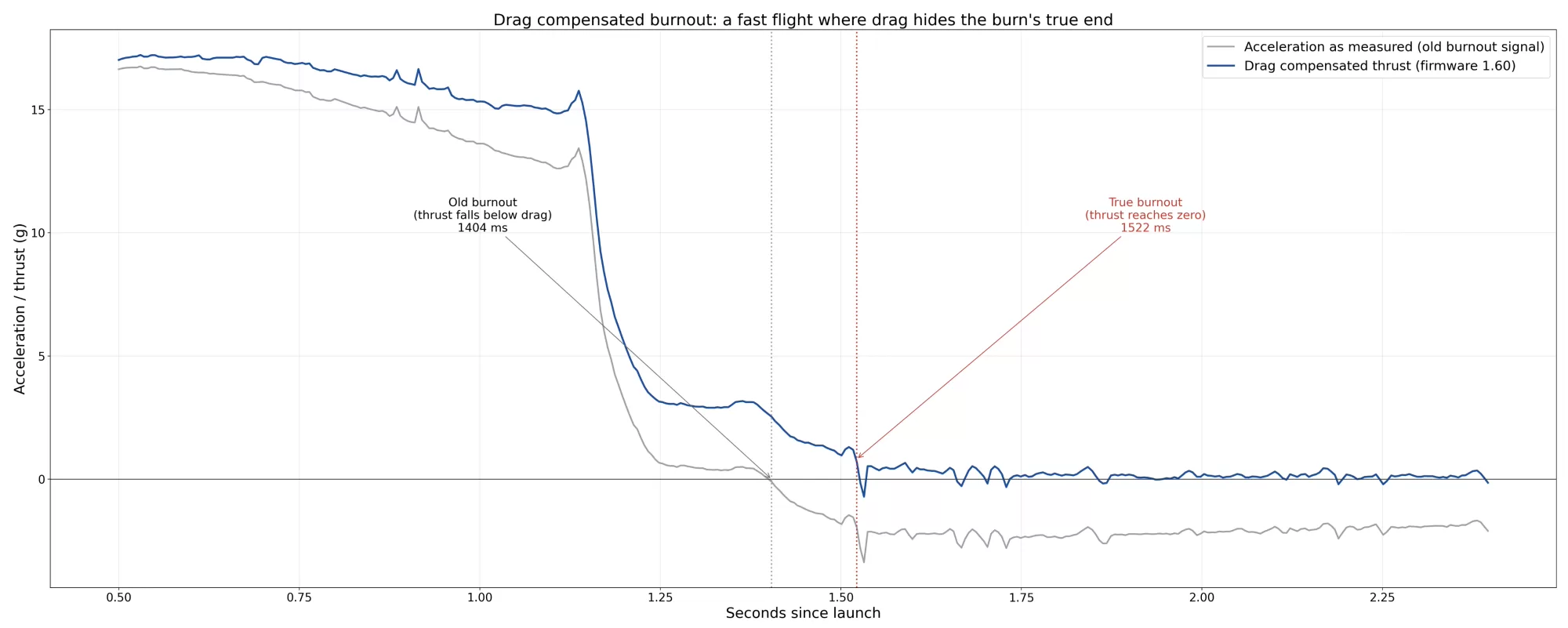
This chart shows the significant difference between acceleration vector sign change to drag compensated thrust detection of burnout.
400Hz data logging
This applies to Nano's with the IMU sensor (revision 4+), the default setting is now 400Hz with hybrid ratio of 8.
This means the Nano will record at 50Hz in the pre flight buffer before jumping to 400Hz for launch until 5 seconds after apogee.
It then lowers to 400/8 with hybrid mode (50Hz) until within 20m of landing altitude where it jumps back up again.
The Nano can still manage long flights by tuning the settings as you need, and you'll still be able to record for 3-4 minutes even with 400Hz and hybrid mode enabled. 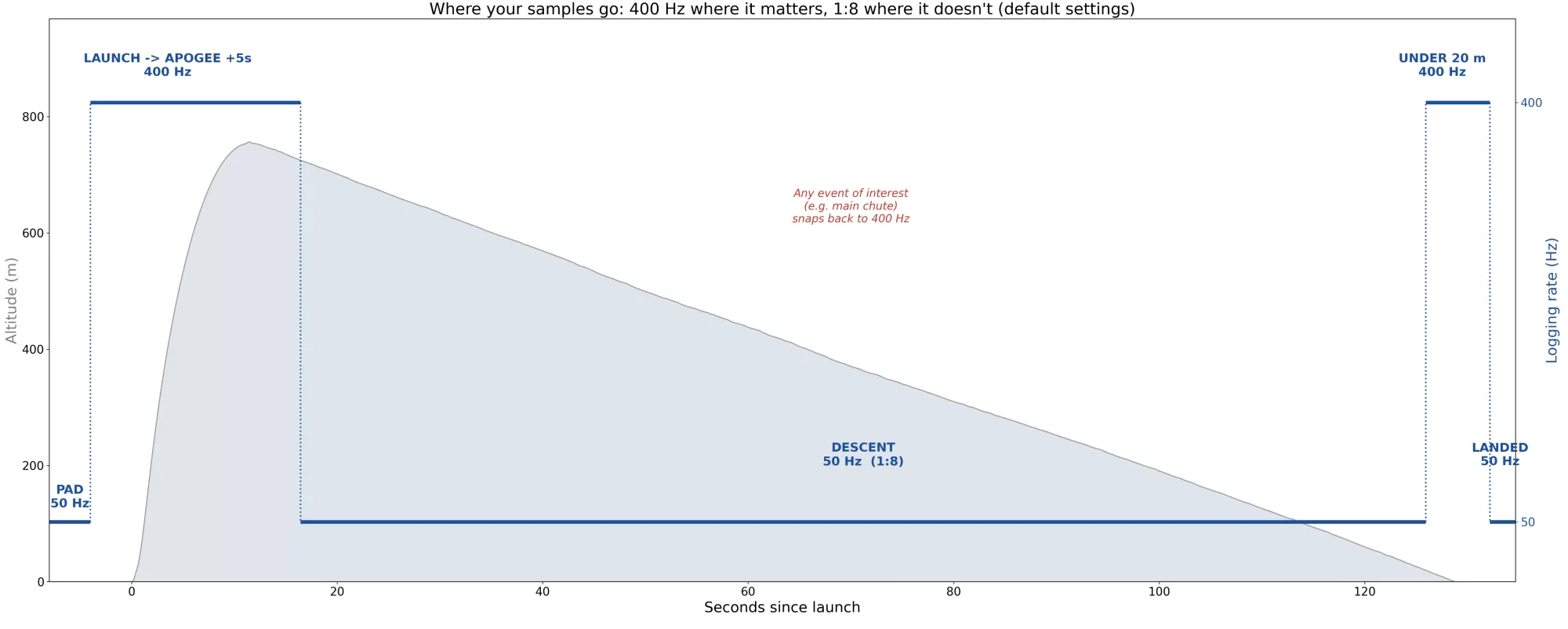
Diagram on how Hybrid mode works.
Violent events that produce significant G forces will also snap resolution back to 400Hz beyond what is shown in the image above.
Truepath version 1.2
Our Truepath filter has been updated as part of our work on the Jupiter and we've bought it across to the Nano.
From a users perspective not a lot has changed, the path will slightly better fit extremly noisy data though and most of the work has been focused towards the noisier / violent end of the flights scale.
It also has a new limit on its repair windows, if they align back to back, to prevent the possibility of extremly long portions of a flight needing to be repaired without enough data throughout the span.
Multiple stages burnout & ignition detection
With the addition of the drag compensated acceleration we're also able to better detect multiple stages.
We do this in two ways, one the standard thrust ending point (defined as < 0.2g thrust) and also by detecting staging signatures that don't neccesarily stop thrusting inbetween them.
ACLZ v2 log format and extra storage
The ACLZ log format (Altimeter cloud log) is a huge step forward for our altimeters. It's now the default format on our altimeters as new firmwares roll out.
This format saves you between 15 and 25 times the storage that a CSV file uses, however not a single bit of data is lost. It's all still there!
The Nano's flight limit was restricted by how big a CSV was it could only store a single CSV at 24,000 samples. You can now store 10-14 full size flight logs at 38000 samples on the Nano, and for typical flights up to the 50 flight log limit should be achievable. While you can't read a ACLZ log like a CSV with ease you can upload them to our website and download a CSV from the website. This means you can benefit from the extra samples limit and storage savings on the device and still grab a CSV when you need.
The ACLZ files not only give you more samples but they also enable the raw pressure and raw altitude to be stored as extra data sets that could not be fit before. ACLZ is a delta-encoded, LZMA-compressed, Ed25519-signed binary flight log carrying the full sample record.
As the Nano has 2.5MB of RAM we are nearing the limits of what's possible in a single compression stream at 38,000 samples, but we will try and squeeze out a bit more optimising in the next firmware.
Velocity fusion
The Nano previously used only pressure to generate it's velocity. This has quite a few flaws as there are lots of ways that pressure spikes can occur during launch and flight which corrupted the velocity.
Accelerometers can offer velocity, however this will stack up drift over time and is also not completely reliable.
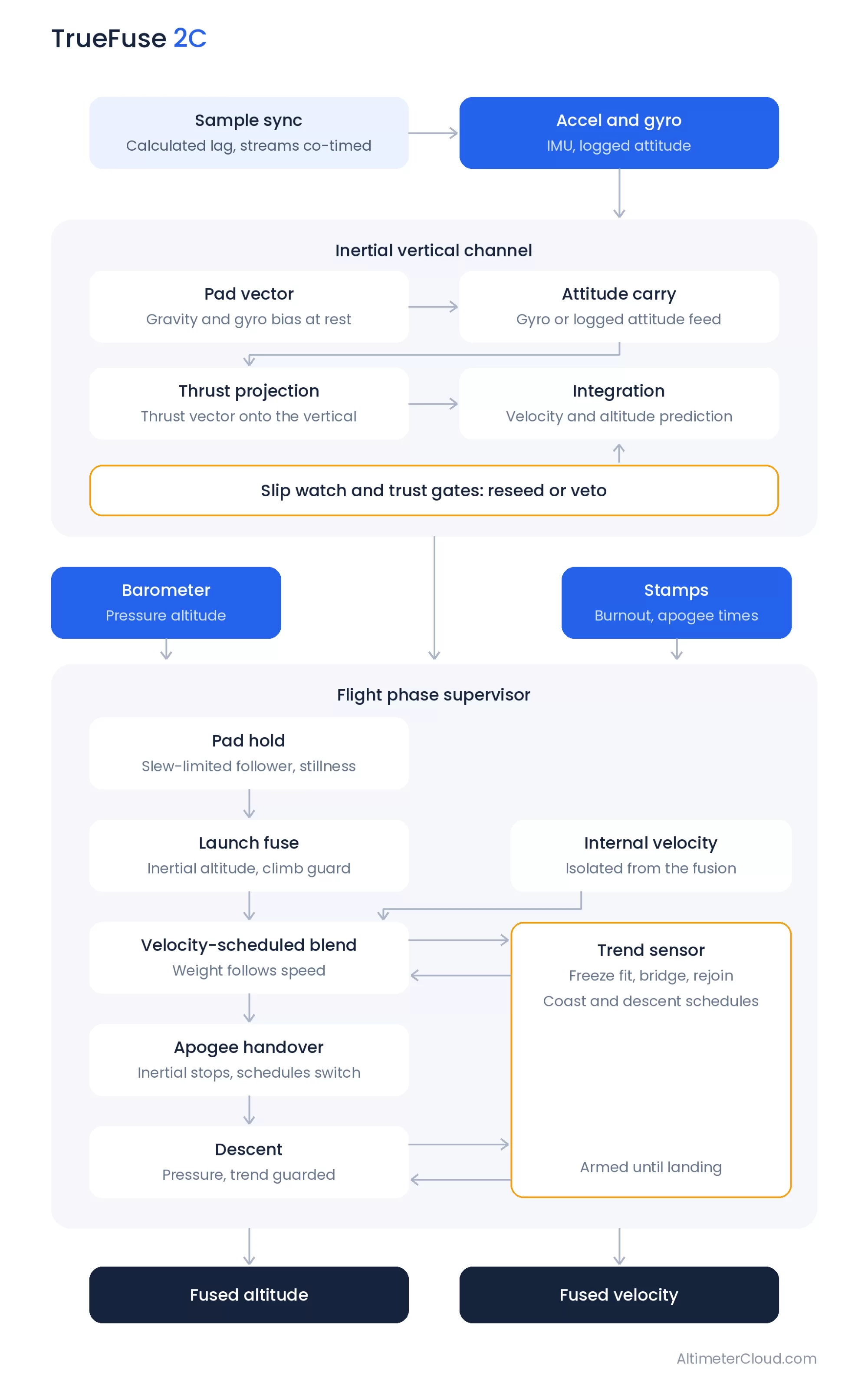
The solution therefore, is a fusion which uses both. The Nano still uses pressure as it's primary signal and then has a variable trust on the accelerometer depending on if it has detected a pressure issue to ride over the event and maintain accurate velocity. Acceleration is not used when the rocket is flying with accurate uncorrupted pressure.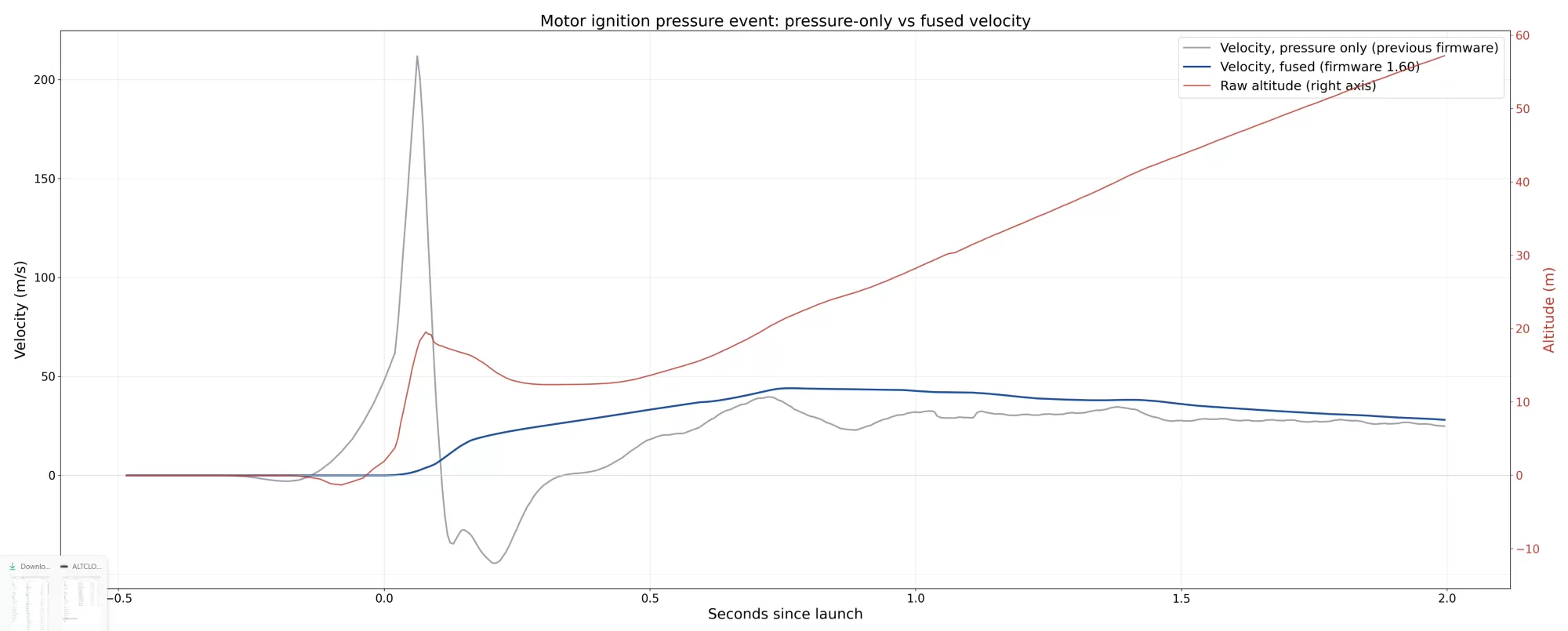
Example showing a corrupted raw altitude at the start of a launch and the old pressure velocity being corrupted by it.
The blue line is the new fused velocity which is now correct.
Pre-flight log extended
The preflight buffer has been extended to at least 8 seconds at full rate. In practise with eMode this can be a lot longer.
We now save the extra time from 4 to 8 seconds at a maximum of 50Hz in to your flight log lettting you see a bit more about pre launch conditions.
The floor altiude has also been moved back to -4 to -8 seconds from -2.5 to -4 seconds to permit a longer launch detection period.
Launch detection
We've increased the verification time with acceleration from 500 to 1000ms, and the no acceleration period to 2500ms. This can be done safely as a result of the increased pre flight buffers.
The pad/floor altitude slew rate has been fully implemented as well. This prevents the base average pressure from changing faster than 2.5 meters per second and helps to avoid vacuum events or pressure events corrupting the floor pressure when you put a nose cone on or off.
USB communication
The Nano can now be spoken to via certain web browsers on PC's and Laptops (Google Chrome, Microsoft Edge and Opera browsers).
This allows users to click on connect and use the Nano settings configurator without the need to edit the text file on the device. You can also upload flights with a click rather than having to locate the physical file on the USB drive of the Nano.
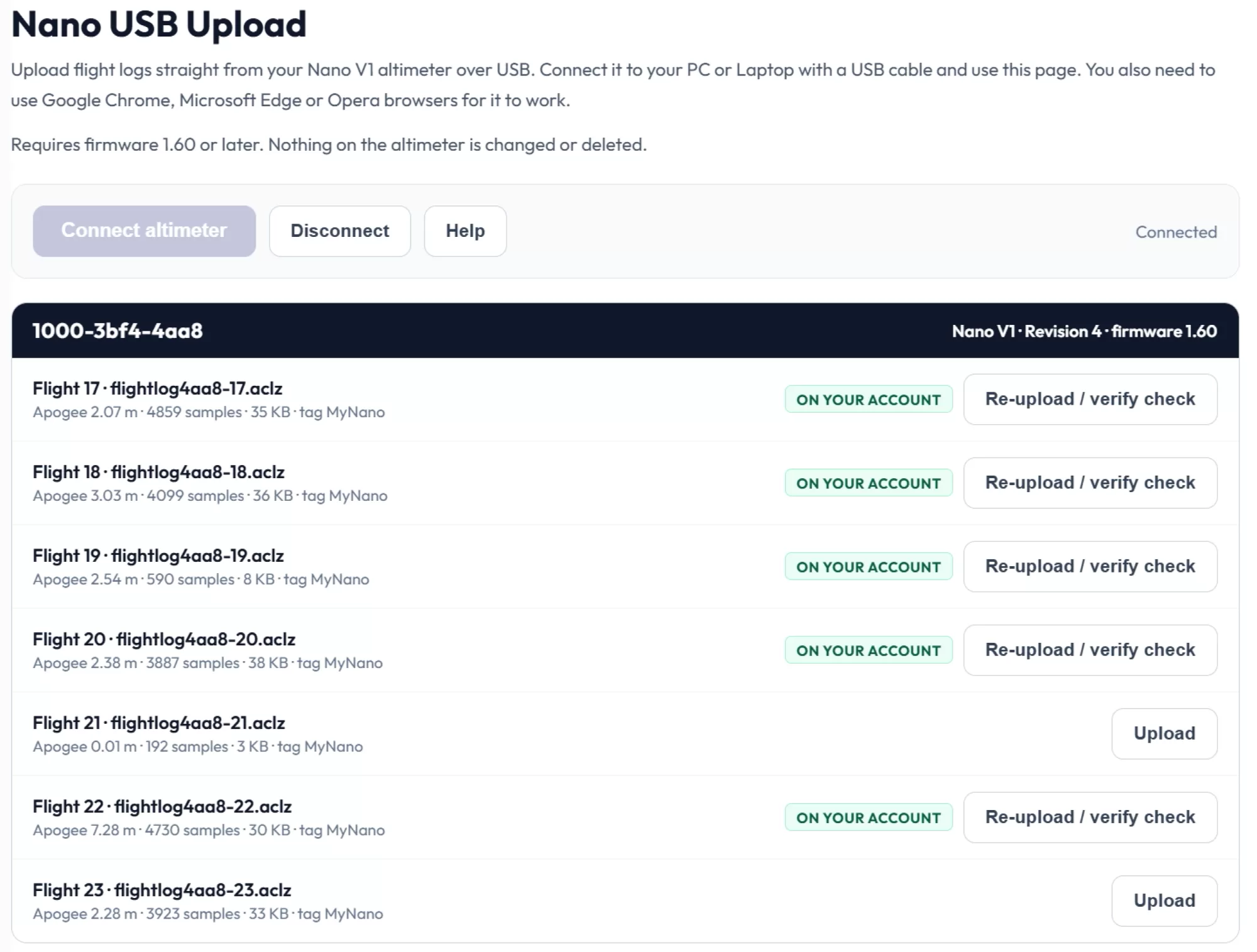
Example of the upload page direct altimeter log uploader via USB.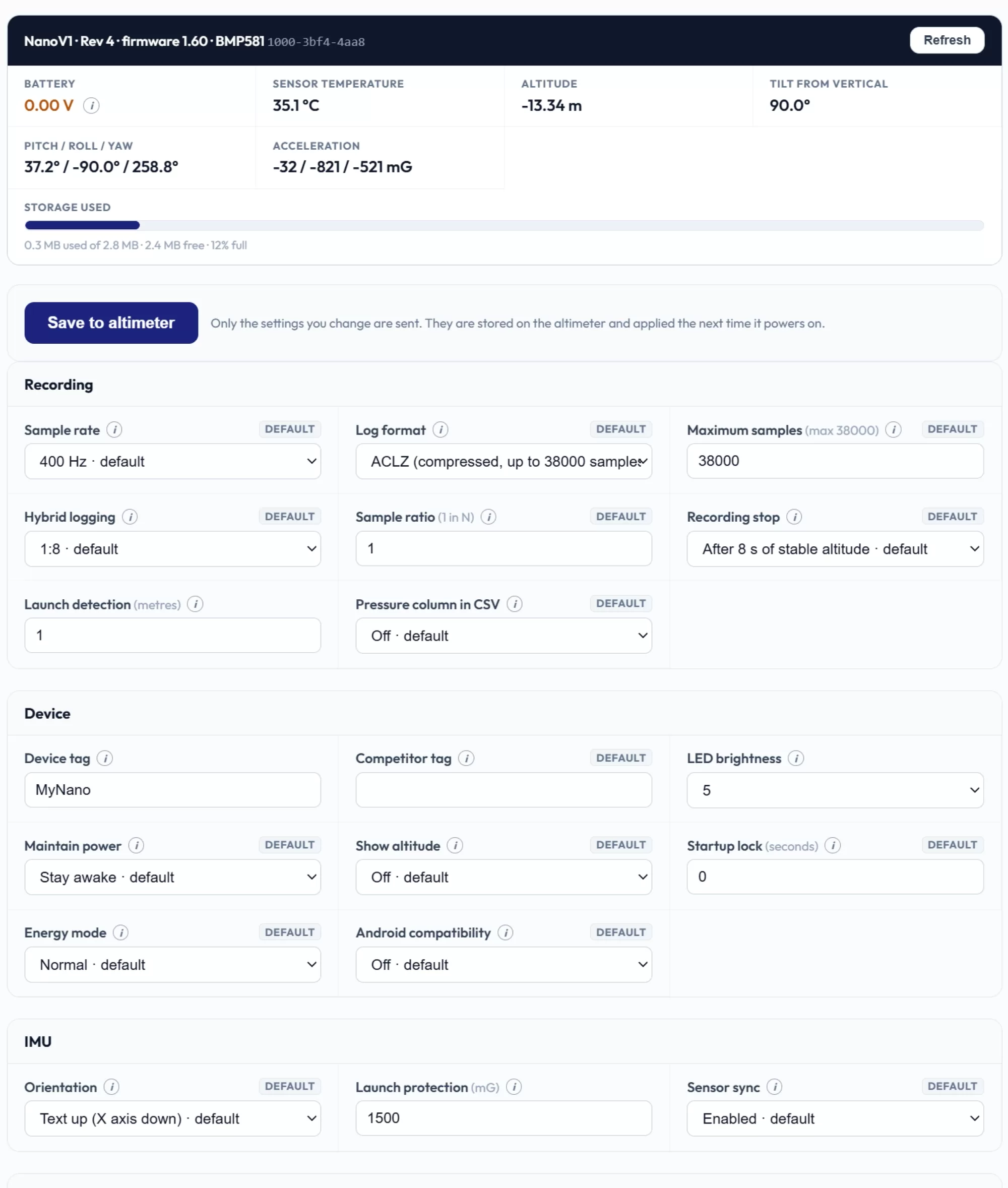
Screenshot of the Configure settings over USB page, you can access it here (via the tools page)
Wake up bug
This affected the post flight behaviour when you selected to go in to deep sleep after 4 or 10 minutes after landing.
The sample cycle sleep timer was remaining set when the deep sleep was requested. The result was that it woke straight back up from deep sleep after a few milliseconds.
This made it look like the device was never going to sleep as requested.
Altitude repair via acceleration comparison.
At motor ignition, the pressure sensor has a hard job: the plume washes the launch area and the barometer records an atmospheric pressure change that did not happen, which appears as altitude. On some flights this appears as a spike or dip around liftoff, occasionally a large one, on one test flight nearly twenty metres of altitude that was never flown. The accelerometer sees none of it, because nothing actually moved that way, and that disagreement is the repair's whole principle: during early flight the accelerometer is proof that the plume cannot fool.
The method is deliberately conservative. While the accelerometer certifies the rocket is still on the pad, any altitude excursion is by definition a pressure error and the trace holds the pad level, though normal pad drift is left exactly as measured. Once real motion starts, the altimeter integrates the accelerometer to know roughly where the rocket must be, and uses that trajectory as a lie detector rather than a pen: pressure is only ruled false when it strays further from the expected path than half the climb itself, a bar that scales with the flight so genuine data can never trip it. A convicted stretch is then rebuilt using the accelerometer's shape for the curve, but anchored at both ends to real pressure samples, so the repair can only ever bridge between measured data, never invent a line of its own. The whole mechanism stands down shortly after burnout, well before apogee, where the barometer is back in sole charge, and every repaired log keeps its raw altitude column so the original measurement is always there to compare. In validation across sixteen recorded flights, only the plume-corrupted flight was altered; every clean flight came through unchanged. 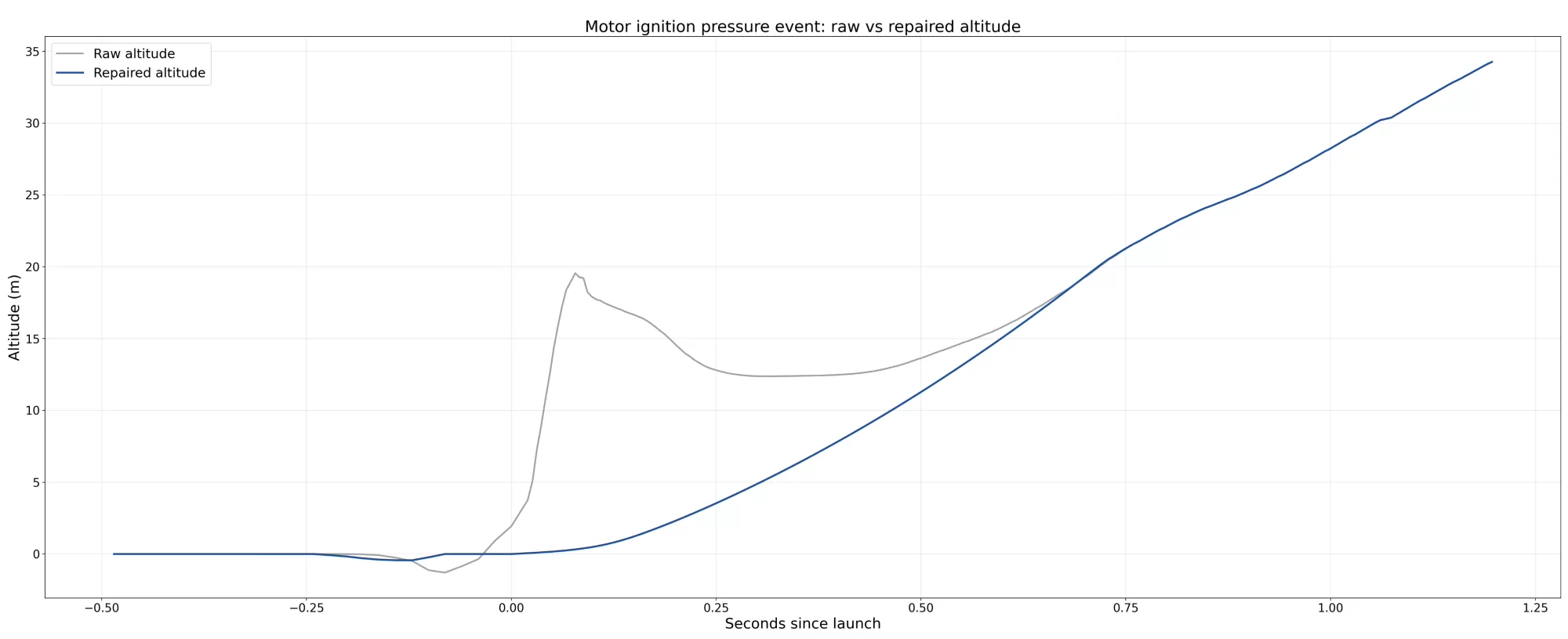
Example of the repair of the early pressure corruption on a sample flight log.
Dual log signatures
Nano flight logs are cryptographically signed on the altimeter at the moment they are saved. Verification on Altimeter Cloud proves a log is genuine and untouched: change a single value and it fails. The signing key never leaves your device, which is the whole point, our servers can verify a log but can never create the signature for one, so a valid signature means one thing only: this data came from this altimeter, exactly as recorded.
With both CSV and ACLZ formats now supported, that guarantee had a gap. Your device saves one format, and when the website converted it to the other for download, the conversion was honest but unsigned, because the website cannot sign anything. From firmware 1.60 the altimeter closes the gap itself: at save it computes and signs both representations of the flight, stores whichever format you have configured, and records both signatures alongside it. When Altimeter Cloud produces the alternate format, it attaches the signature your altimeter already made for exactly that data. If every value matches, and it will unless something has been tampered with, both formats verify. The same protection, both downloads, signed by nothing but your altimeter.