The Mercury altimeter can, given just a few variables about your rocket, calculate an estimated apogee during the coasting phase after motor burnout. This prediction runs at up to 100Hz and is shown on your flight charts. Requires firmware 2.1 or later.
This information can be used in the action rules system as a condition (using "Predicted apogee" or "Air brake on percent"), or to drive the automatic air brake system described below.
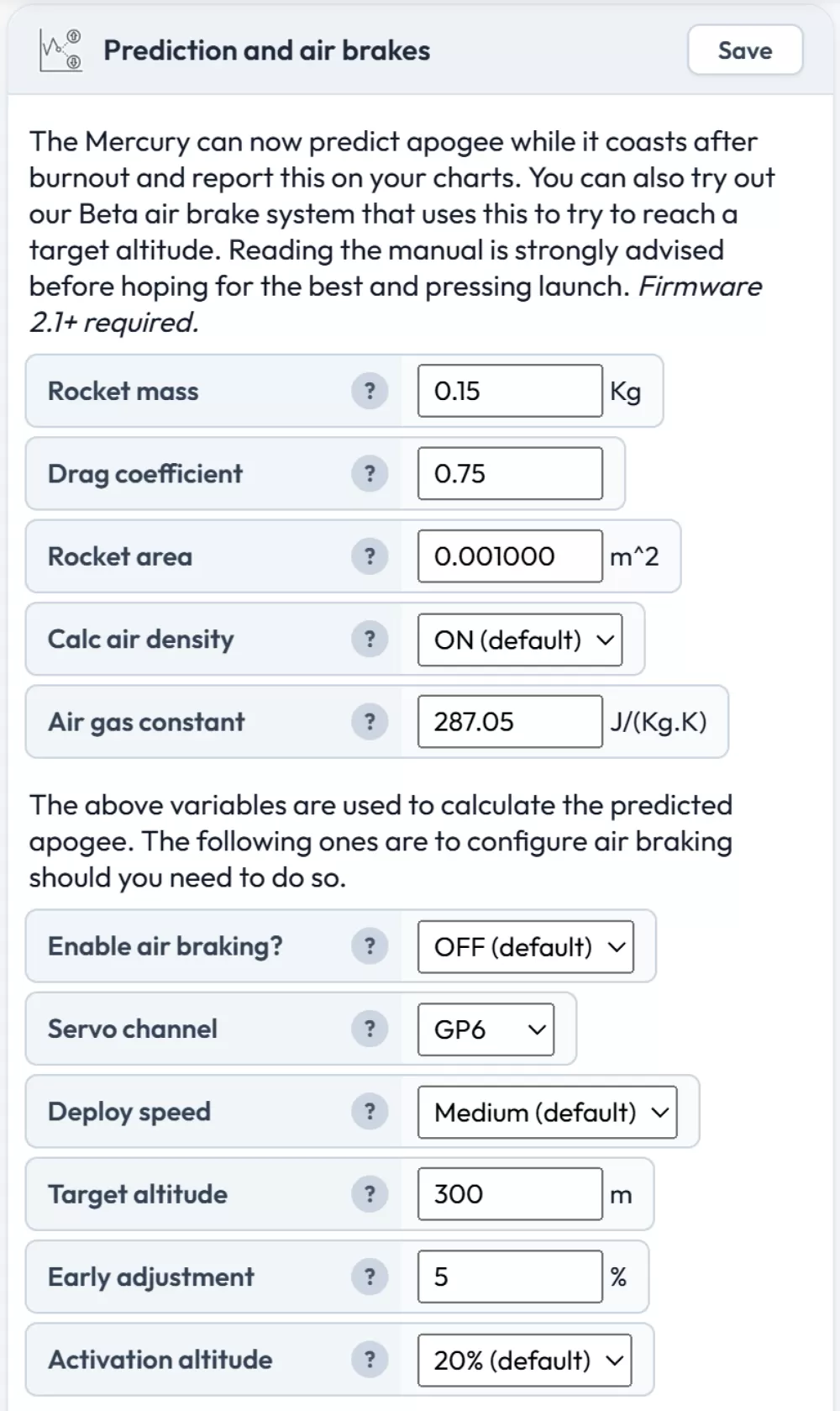
Apogee prediction settings
There are 5 settings for the prediction algorithm. You need to fill in the first 3 accurately for good results.
Rocket mass
This is the mass of your rocket at burnout in kilograms. So your complete rocket as you fly it, but with a spent motor case rather than a fresh one. For the most accurate predictions you want to get this as close as possible.
If you can't get your hands on a used motor casing, look up the motor's net propellant weight and subtract this from the loaded motor weight for a rough estimate of the spent casing weight.
Drag coefficient
For most rockets this value will be between 0.4 and 0.8. A value of 0.75 is a reasonable starting point. If you use simulation software such as OpenRocket or RockSim, you can get a more accurate figure from there.
If you find on a test flight that the estimated apogee is much higher than reality, your coefficient is likely too low — increase it to lower the estimate. If the estimate is too low, decrease the coefficient to increase the predicted altitude.
Rocket area
This is the cross-sectional area of your rocket as viewed from above, in square meters (m²). You can estimate this by taking the area of the cross-section of your airframe body tube and adding the fin width and thickness. Don't forget to work in meters for this value.
For reference, a 38mm body tube has a cross-sectional area of approximately 0.00113 m².
Calculate air density
When enabled (the default), the Mercury calculates the density of the air at the rocket's current altitude during flight for the most accurate prediction. If disabled, it uses a static average based on approximately 400 meters altitude, which should be mostly fine if you're flying below 1000 meters.
Important: You need to enter the accurate forecast pressure for the day and location you are flying for this function to calculate your altitude above sea level correctly. Set this in the flight settings.
Air gas constant
This is the specific gas constant for dry air. The default value is 287.05 J/(kg·K). You would only want to consider changing this if you're flying in very damp air conditions, and even then the difference is small.
Air brake configuration
The air brake system uses one servo channel to control air brake deployment during the coast phase. If enabled, the system will attempt to bring your rocket to a target altitude by gradually deploying and retracting the brakes based on the predicted apogee. You will still want to choose a motor that gives you slightly more altitude than your target.
Even though it only uses one servo channel (either the GP solder pads or an external I2C expansion board), you can connect more than one servo's signal wire to a single channel if you need to drive multiple servos simultaneously.
Note: Make sure you configure the chosen servo channel with the OFF angle set to your brakes fully closed and the ON angle set to fully deployed. Also ensure you do not use the same servo channel in the action rules to avoid a conflict. See the servo configuration page for setup instructions.
Enable air braking
A simple on/off toggle for the air brake system. Off by default.
Servo channel
Select which servo channel controls your air brakes. The options are GP6, GP7, or any of the 6 channels on the I2C PCA9685 expansion board (I2C #1 through #6).
Deploy speed
The air brakes deploy gradually while the system waits for updated predictions, and retract rapidly when the predicted apogee drops below target. This setting controls how quickly the brakes ramp up to full deployment:
- Fast — OFF to fully deployed in 0.5 seconds
- Medium (default) — OFF to fully deployed in 1 second
- Slow — OFF to fully deployed in 2 seconds
Target altitude
The altitude in meters that you are targeting. The system will attempt to bring the predicted apogee as close to this value as possible during the coast phase.
Early adjustment
This setting helps prevent the system from removing too much energy from the rocket early in the coast phase when prediction tolerances may overestimate the apogee. It works by targeting a slightly higher altitude until the rocket reaches 85% of the target height.
For example, if you set the target altitude to 1000 meters and the early adjustment to 5%, the Mercury will target 1050 meters until the rocket reaches 850 meters altitude. It will then switch to targeting the true 1000 meters for the remainder of the coast. A good setting is typically anywhere from a few percent to 10–20%.
Activation altitude
This is the altitude as a percentage of the target altitude at which the system will begin operating. The options range from 10% to 80%, with 20% as the default.
For example, with a target altitude of 300 meters and activation set to 40%, the system will start deploying brakes once the rocket exceeds 120 meters.
Regardless of this setting, the air brakes will not operate until burnout is detected, as the prediction algorithm is only accurate after burnout.
Using prediction data in action rules
Even if you don't use the automatic air brake system, the predicted apogee data is available as a condition in the action rules system. You can use "Predicted apogee (m)" and "Air brake on percent (%)" as condition data to build custom rules. For example, you could trigger an action only if the predicted apogee exceeds a certain altitude, or use the air brake percentage to coordinate other systems.