The Nano keeps all of its user-editable settings in a single file called device_settings.txt, in plain-text JSON format. You can edit that file directly over USB with any text editor, or use the Nano USB Settings tool on the Altimeter Cloud, which reads and writes the settings for you over the USB cable. This page covers both, and what every setting does. Note that all heights and distances are given in metres, not feet.
Reference for firmware 2.00. Earlier firmware may differ; your exact version is shown in device_information.html.
- With the Nano's power switch off, connect it to your PC, laptop, tablet or smartphone with a USB cable. It mounts as the ALTCLOUD drive.
- Open
device_settings.txtin any plain-text editor. - Change the values you want. Keep the JSON structure intact: every entry needs its quotes, the colon between name and value, and a comma after it (except the last one), all inside the surrounding
{ }braces. Text values (the tags) stay in quotes; numbers are written without quotes. - Save the file, then eject the drive safely.
- Power-cycle the Nano (disconnect USB and switch it on, or unplug and replug). Settings are read and applied on the next power-on.
!IMPORTANT
If the file contains any JSON error, or a value that is out of range or unsupported, the Nano discards the whole file and rewrites it with default values on the next power-on. So if your changes seem to have vanished, check for a typo or a value outside the allowed range. Always leave "device": "NanoV1" unchanged, if it doesn't read as NanoV1, none of your settings are applied.
If you would rather not edit JSON by hand, the Nano USB Settings tool does the same job from your browser with drop-down boxes for every setting. It needs firmware 1.60 or later and Google Chrome, Microsoft Edge or Opera on a desktop or laptop.
- Connect the Nano with a USB data cable (a charge-only cable will not work) and open the tool.
- Click Connect altimeter and pick the entry that mentions TinyUSB. If none does, unplug the Nano and see which entry disappears.
- The tool reads the current settings. Change what you need and click save. Only the values you changed are sent, and the Nano checks each one against the same ranges as the settings file, so it cannot be given a value it would refuse. Any it does refuse are outlined in red with the reason.
- The new values are used straight away and written into
device_settings.txtthe next time the Nano powers on.
A fresh Rev4 or later Nano writes these values:
{
"Important": "Check the manual for correct values",
"device_tag": "MyNano",
"competitor_tag": "",
"device": "NanoV1",
"android_compat": 0,
"log_format": 1,
"emode": 1,
"factoryreset": 0,
"hybrid_mode": 8,
"include_pressure": 0,
"launch_detect": 30,
"launch_protection": 2000,
"led_brightness": 5,
"maintain_power": 1,
"max_samples": 38000,
"orientation": 1,
"recording_stop": 1,
"sample_ratio": 1,
"sample_speed": 400,
"show_altitude": 0,
"startup_lock": 0,
"sync_enable": 2
}
Rev1 to Rev3 boards have no IMU, so their file leaves out include_pressure, launch_protection, orientation and sync_enable, and defaults to "sample_speed": 50 and "hybrid_mode": 0.
Settings marked Rev 4+ rely on the IMU and only apply to Revision 4 and later boards.
iThese fields are sealed into every flight log
When the Nano saves a flight, the device tag and competitor tag are written into the log, and the whole log is then signed with the Nano's Ed25519 digital signature. A saved log cannot be changed afterwards, not even these tag fields, and still pass verification or be uploaded to the Altimeter Cloud. Editing device_settings.txt itself is fine; it only changes the values used for future flights. There is more on the security page.
device_tag Default "MyNano" · text, must not be empty, up to 20 characters
A label for this altimeter. It's written into the header of every flight log and, if you upload a log to the Altimeter Cloud, applied to the flight page there too.
competitor_tag Default "" (empty) · text, up to 20 characters
Optional field for your FAI or NAR competition number. It's written into the flight log header and covered by the log's signature. Leave it empty if you're not competing.
device Default "NanoV1" · do not change
Identifies the device type. If this isn't "NanoV1", none of your settings are applied and the file is replaced with defaults.
launch_detect Default 30 · range 1 to 199 m
Height in metres above the ground reference that the altimeter must climb above before a launch can be confirmed. It then has to stay above it for 1 second with the motor still burning, or for 2.5 seconds on altitude alone (see the flight mode page). The log still includes the climb from the pad, because the Nano keeps a pre-flight buffer running at all times. Values of 25 to 50 m suit most flights.
startup_lock Default 0 · range 0 to 999 s
Prevents launch detection until this many seconds have passed since power-on. 0 turns it off. Useful if you need time to close up the rocket after switching on.
launch_protection Default 2000 · range 0 to 10000 mGRev 4+
Thrust threshold for launch confirmation, in milli-G of total acceleration. This is the whole magnitude including gravity, so a still altimeter already reads about 1000, and the default of 2000 asks for 1 G of real acceleration. The quick route to a launch needs the motor still pushing once the altitude has been above the launch detect height for 1 second: the acceleration must be above this value at that moment, and have stayed above it without a break for at least 400 ms (or above twice the value for 200 ms). A knock on the pad earlier on cannot count towards it, and scattered spikes from handling do not add up. Shorter burns simply confirm on the 2.5 second altitude route instead, with nothing lost, because the log reaches back to before lift-off. Set 0 to turn the accelerometer check off, leaving the 2.5 second altitude-only route as the only way to a launch. 4000 suits a pad where the rocket gets handled or knocked about. Note that 1 does not mean "on": it means 1 mG, which in practice switches the protection off.
recording_stop Default 1 · 1, 2 or 3
When recording ends. 1 = after 8 seconds of stable altitude; 2 = after 16 seconds; 3 = only at max_samples. These are real seconds at every sample rate and hybrid setting. Whatever you choose, the Nano always stops and saves on low battery, on overheating, or when it reaches max_samples.
max_samples Default 38000 · range 4000 to 38000
The maximum number of samples in one flight log, including the few seconds of pre-flight data saved from before lift-off. CSV logs are capped lower, see log_format.
sample_speed Default 400 (Rev4+), 50 (Rev1 to 3) · 50, 100, 200, 250, 300, 350 or 400 Hz
How many times a second the Nano samples its sensors in flight. A higher rate captures more detail but uses more battery and fills the log faster. With max_samples at 38,000 samples, sample_ratio at 1 and hybrid mode off, a log lasts about 12 minutes at 50 Hz, 6 minutes at 100 Hz, 3 minutes at 200 Hz and 95 seconds at 400 Hz. Hybrid mode, on by default on Rev4, stretches these a long way. Rev1 to 3 boards use the BMP390 pressure sensor, which updates at 50 Hz, so higher rates add no pressure detail on those boards.
sample_ratio Default 1 · range 1 to 50
How often samples are written to the log. The Nano always runs at the full sample_speed; this setting only thins out what is saved. 1 = save every sample, 2 = every other, 3 = every third, and so on. The log never drops below 10 samples a second, so the ratio is capped at sample_speed divided by 10 (40 at 400 Hz, 10 at 100 Hz, 5 at 50 Hz), and anything higher is quietly applied at the cap. When hybrid mode is on it takes over from this setting after apogee.
hybrid_mode Default 8 (Rev4+), 0 (Rev1 to 3) · 0 or 1 = off, or 2 to 10
Adaptive sampling for long flights. The climb, apogee and the first 5 seconds after it are logged in full. Then the log drops to one sample in N (8 by default, so 50 Hz at the default 400 Hz). On the way down it returns to every sample below 20 m above the ground to capture the landing precisely, and 3 seconds after it sees the landing it drops back to one in N until recording stops. On top of that, any burst of more than 7 G, such as a main parachute opening mid-descent, returns the log to every sample for as long as it lasts plus one second. With the defaults a typical flight leaves roughly 30,000 samples for a 50 Hz descent, which is around ten minutes under canopy.
log_format Default 1 · 0 or 1
1 = ACLZ, the Nano's own compressed binary log, and the one we recommend. It holds every sample to the same precision as a CSV, plus the raw (unfiltered) altitude and the pressure, in a fraction of the space, signed on the Nano before it is compressed. It cannot be opened in a spreadsheet: upload it to the Altimeter Cloud to see the charts, and download it there as a CSV if you want one. 0 = CSV, plain text that opens straight off the drive in a spreadsheet, but it is much larger, so it is limited to 22,000 samples (20,000 with include_pressure) and only about one full-length log fits on the drive. ACLZ keeps up to 50 flights. The flight log format page explains the benefits in full; see the flight log format page.
include_pressure Default 0 · 0 or 1Rev 4+
1 adds a Pressure(hPa) column as the last column of a CSV flight log. It is worked out at save time from the logged altitude using the standard atmosphere, so it costs no memory during the flight. ACLZ logs carry the pressure anyway.
emode Default 1 · 1 or 2
Energy saving while waiting on the pad. Once the Nano has been on for 30 seconds and its pre-flight buffer is full, it idles its loop at a lower rate: 1 = 50 Hz; 2 = the CPU wakes only 25 times a second and reads every IMU sample buffered since its last wake, so nothing is lost. Any movement of more than about 0.3 G jumps it straight back to the full sample_speed, and it only falls back to idle after 6 seconds of calm, so a real launch is recorded at the full rate. The idle rates apply at 100 Hz and above on Rev4 and later boards; 50 Hz already is the idle rate.
How the idle rate works
emode 1 idles at 50 Hz. A movement bump jumps it straight to the full sample_speed; with no launch it drops back to 50 Hz after 6 seconds of calm. At launch it stays at the full rate for the whole flight.
emode 2 behaves the same but the CPU only wakes at 25 Hz to save more power. It still logs at the full 50 Hz before launch: each time it wakes it reads every sample buffered since the last check, so no data is dropped. It still jumps straight to the full rate on a bump or a launch.
The jump back to full speed is very sensitive, so in almost all of our testing the igniter's initial thrust triggers it instantly and the whole motor burn is captured at the full rate from the very start. The most you would ever record at the idle rate before the jump is one idle cycle: about 20 ms in emode 1, or about 40 ms in emode 2.
maintain_power Default 1 · 0 to 3
What the Nano does after saving a flight. 0 = switch off the sensors and LED and sleep until you power-cycle it. 1 = stay on and blink the recorded apogee on the status LED, repeating until you connect USB or power-cycle. 2 = blink the apogee, then sleep after 4 minutes. 3 = blink the apogee, then sleep after 10 minutes. How to read the blinks is on the altitude blinking page. After an overheating stop the Nano always sleeps rather than blinking.
show_altitude Default 0 · 0 or 1
1 = blink the most recent flight's apogee once at the end of start-up, then carry on as normal. 0 = off. A short press of the boot button shows it on demand either way.
led_brightness Default 5 · range 1 to 10
Status LED brightness, which also saves a little power when dimmed. The scale runs the other way to what you might expect: 1 is brightest and 10 is dimmest.
orientation Default 1 · 1 to 6 Rev 4+
Tells the Nano how it is mounted in the rocket so it can work out the flight angles correctly. Match the number to the orientation diagram, where the marked direction (the ^ arrow) points up towards the nose:
- 1 = standing upright, board face towards you, micro-USB at the bottom (default)
- 2 = standing upright, board face towards you, micro-USB at the top
- 3 = on its side, board face towards you, micro-USB to the right
- 4 = on its side, board face towards you, micro-USB to the left
- 5 = lying flat, board face (component side) up
- 6 = lying flat, board face (component side) down
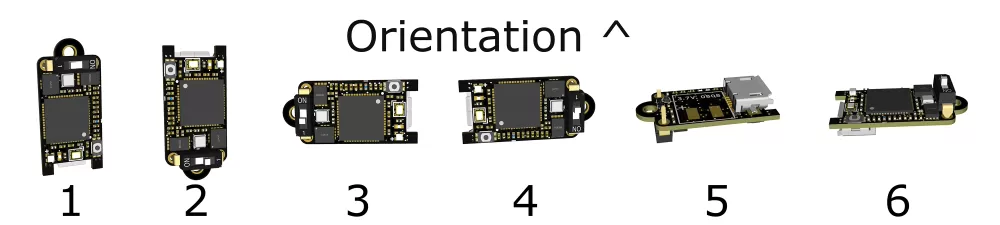
sync_enable Default 2 · 0, 1 or 2Rev 4+
Aligns the pressure and IMU data streams. Filtering makes the pressure altitude lag slightly behind the accelerometer; with this enabled (2) the firmware measures that offset and shifts the accelerometer data so the two line up. 0 or 1 disables it.
android_compat Default 0 · 0 or 1
How the Nano identifies itself as a USB drive. 0 = a fixed serial number, so your computer recognises the same altimeter every time. 1 = a fresh serial number at every power-on, for phones and tablets that refuse to open a drive they have seen before. Only change this if your Nano will not appear a second time on a phone.
factoryreset Default 0 · 0 or 1
Set to 1 to reformat the file system and rewrite every setting back to its default on the next power-on. It returns to 0 afterwards. There are other ways to reset on the factory reset page.
The Nano reads device_settings.txt at every power-on. If anything in it is wrong it throws the whole file away and writes a fresh one with default values, so this is an easy check:
- Save your edits and eject the drive.
- Unplug the Nano from USB and plug it back in. This restarts it so it reads the file fresh.
- Re-open
device_settings.txt. If your values are still there, they have been accepted. If the file has gone back to the defaults, it contained a JSON error or a value outside the allowed range, so check it against the ranges above and try again.
The one exception is sample_ratio: a value above the 10 Hz cap is accepted and stays in the file, but the Nano uses the cap. The Nano also rewrites the file itself, keeping your values, when a firmware update adds new settings and after changes made with the USB Settings tool.
For FAI compliance, several values that older firmware exposed are now fixed in firmware and can no longer be changed. If you add any of these keys to the file they are simply ignored (and won't, on their own, cause a reset). The fixed values are still written into the CSV header for reference:
- Sea-level reference pressure, fixed at 1013.25 hPa (ISA standard).
- Fixed temperature, fixed at 15 °C (ISA standard).
- Temperature use, off.
- IIR filter, fixed at 7.
- Kalman filter, fixed at 2.
- Sensor oversampling, fixed per hardware revision (16 on Rev 4+ with the BMP581, 8 on Rev 1 to 3 with the BMP390).
Older settings files or documentation may still list keys such as fixed_temp, sealevel, use_temperature, iirfilter or kalmanfilter, these no longer have any effect.