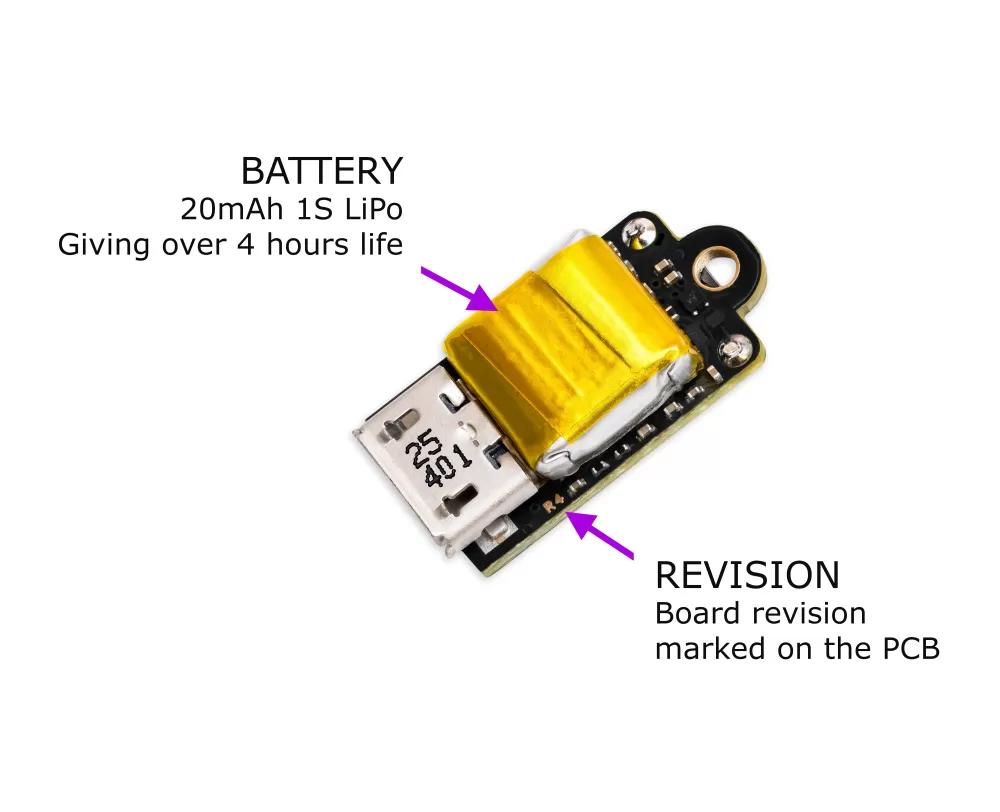
The Nano runs on a tiny onboard 20 mAh lithium polymer battery. This page covers how long it lasts, how to charge it and read its level, and how to look after it.
Battery life
| On a full charge | |
|---|---|
| Waiting on the pad | Just under 5 hours |
| Flights | 5 to 8 typical flights at 417 Hz |
| Charge time | Under 1 hour from empty |
The Nano spends most of its time asleep between sensor readings, which is how such a small cell can keep it waiting on the pad for hours. Once the pad has been calm for a while it drops to a lower power rate, and emode 2 stretches that further. Higher logging rates and the high speed sensor setting use a little more.
You can expect 100 to 200 charge cycles before the battery settles to around 80% of its original capacity.
Low battery
| When | What happens |
|---|---|
| At switch-on, under 3.70 V | Red and orange alternating four times, then start-up carries on. Charge it before flying if you can |
| On the pad and in flight | A short coloured flash after each blip once the battery is getting low (see below) |
| In flight, at 3.05 V | Recording stops and the flight is saved |
| Any time, at 2.92 V | A dim red flash, then the Nano switches itself off to protect the cell. A flight still recording is rebuilt from its backup at the next start |
After switching off for a flat battery, the Nano sleeps until you press the button or plug in USB.
Charging
Connect the Nano to a computer or USB charger with a micro-USB cable. It charges automatically whenever USB power is present, and the onboard charger stops at a full 4.2 V on its own, so you can't overcharge it by leaving it plugged in. The charge LED is lit while it charges and goes out when it is full.
While it is plugged in the Nano is in USB mode, so you can change settings or copy your flight logs off at the same time. Charge it at 0 to 45 °C, on a hard, non-flammable surface where you can keep an eye on it. If the board gets too hot on USB, it flashes red quickly for 10 seconds and switches off.
Reading the battery level
In USB mode, the LED breathes blue and every 3 seconds flashes a colour for the battery level. The percentages are rough guides.
| LED in USB mode | Battery |
|---|---|
| Red | Under 3.70 V (under about 15%) |
| Orange | 3.70 to 3.80 V (about 15 to 40%) |
| Purple | 3.80 to 4.00 V (about 40 to 80%) |
| Green | 4.00 V and over (about 80% to full) |
In flight mode, there is no battery colour while the battery is healthy. Once it is getting low, a short flash follows each blip on the pad:
| LED in flight mode | Battery |
|---|---|
| No extra flash | Above 3.74 V |
| Blue | 3.68 to 3.74 V |
| Orange | 3.60 to 3.68 V |
| Red | Under 3.60 V. Charge before flying |
Testing your battery
The Nano can measure its own battery life:
- Open
batterytest.txton the Nano's drive, change the 0 on the first line to 1, save it and eject. - Charge the battery fully, then unplug and switch the Nano on.
- It sits exactly as it would on the pad, recording the battery voltage every 30 seconds until it switches itself off. This takes several hours.
- Switch it on again or plug it in.
batterytest.htmlis waiting on the drive with the discharge curve and every reading.
The file resets itself to 0, so a test never runs twice by accident. Launch detection stays on during a test, so if you fly it by mistake, the flight is recorded and saved as normal.
Storing the Nano
A lithium cell lasts longest stored at around half charge, rather than full or empty. Deep sleep still draws a small current, and the only way to isolate the battery fully is to switch the power switch off.
- If it is empty, charge it for about 20 minutes to bring it to around half.
- If it is fully charged, for example when you put it away for the winter, switch it on in flight mode for about 2 hours and then switch it off, and it will be near half charge.
- To check, plug it in with the power switch ON: a purple flash every 3 seconds (3.80 to 4.00 V) means it is roughly half.
Switch the power switch off for storage, and top it up to around half now and again if you leave it for months.
Replacement and care
The Nano's battery is soldered to the board and isn't user-replaceable. We strongly advise against trying to remove or replace it yourself.
If your Nano's battery life, tested in emode 2, falls below 2 hours 30 minutes within 5 years of its date of manufacture, we will replace the battery free of charge. Post your Nano to our UK factory and we will fit a new battery and send it back at our own cost. This covers batteries that have worn through normal use, not devices that have been misused or physically damaged.
To check, set "emode": 2 in the settings and run the battery test above. If it switches itself off in under 2 hours 30 minutes, please contact us at info@modelrockets.co.uk.