Every height reading on the Nano starts life as a raw air pressure measurement, and during a flight that raw pressure gets knocked about by things that have nothing to do with the rocket's true height. Two processes turn those raw readings into the clean flight you see in your data, and both run on the Nano itself when the flight is saved: TrueFuse, which uses the motion sensor to repair the moments pressure cannot be trusted, and TruePath, which removes the remaining spikes and smooths the trace. This page explains, in general terms, what each does for you, why they run after the flight rather than during it, and how your velocity and apogee come out of them.
TrueFuse is our altitude fusion filter. It combines the barometer with the accelerometer and gyroscope to fix the two places where pressure altitude lets you down: the launch, where the airflow past the vent holes makes the pressure misread while the rocket is accelerating hard, and ejection, where the pressure spike has nothing to do with where the rocket is. Away from those moments the output is the barometer. It never invents altitude.
The Altimeter Cloud runs TrueFuse too, and its reference can be a newer revision than the one in your firmware, so the website's figures can differ very slightly from the Nano's own. If TrueFuse cannot run on a flight, for example because the flight is too short or the motion data is not there, it stands down and the barometer trace goes on to TruePath untouched, and the log header records which happened. TrueFuse needs the motion sensor, so it runs on Rev4 and later boards; earlier boards use TruePath alone.
TruePath is our own in-house developed filtering system. What it does for your data is easy to describe. During a flight the pressure around the sensor gets knocked about by all sorts of things that have nothing to do with how high the rocket is: the sharp pressure pulse from an ejection charge, the disturbance as the rocket pushes through the sound barrier, the buffeting and swinging as it comes down on its shock cord in the wind, and even sunlight falling on the sensor once it is out in the open. All of these show up in the raw trace as spikes and wobble that are not real changes in height.
TruePath takes that raw trace and produces a clean height trace that follows what the rocket actually did. It removes the disturbances that are not real height changes, and does so without the lag you would get from simply averaging the readings together, so the quick, genuine moments, the hard acceleration off the pad and the turn at apogee, stay sharp.
In other words, you get a height trace you can trust, smooth where the flight was smooth and crisp where the flight was quick, rather than the jagged raw signal the sensor hands over.
It is worth being clear about what this does and does not mean. TruePath does not invent data or estimate where your rocket went. It works only from the readings the Nano actually recorded during the flight, and it never predicts, fills in or makes up anything that was not measured. What it does is identify the readings that are clearly wrong, the spikes and disturbances that cannot be genuine changes in height, and remove them. What is left is the real flight the rocket flew, which is exactly what the name means: the true path through your data.
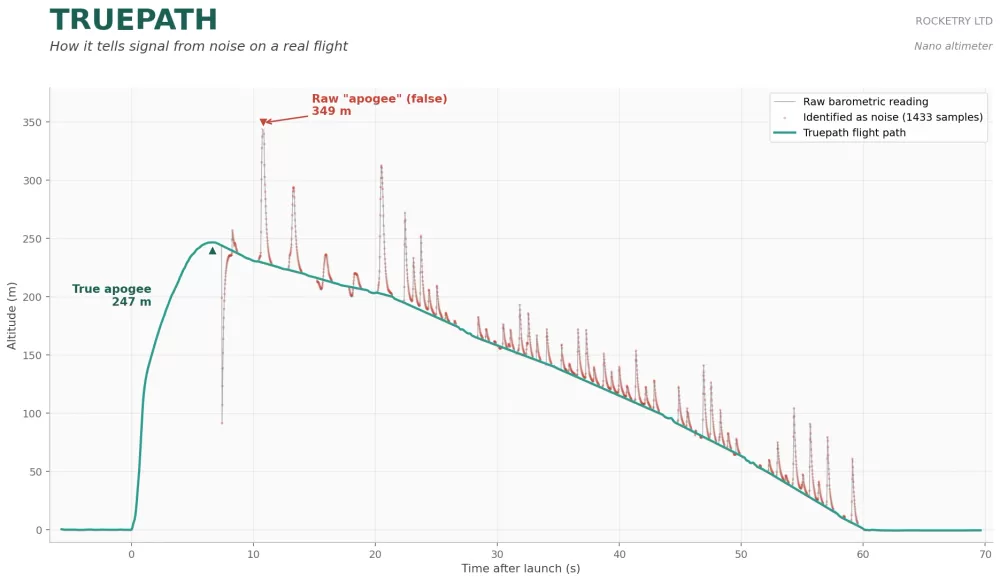
Example of an excessivly noisy chart tested through our TruePath v1.0 filter
Some altimeters double as flight computers, firing charges or driving airbrakes in the air, so they have to filter their readings live, the instant each one arrives. The Nano is a pure altimeter. It only records, so it has no reason to clean the data in real time. Instead it does the opposite: during the flight it simply logs the raw readings as fast as it can, up to 400 times a second on Rev4 and later boards and 50 times a second on earlier ones, and saves all the cleaning for afterwards.
TrueFuse and TruePath then run over the whole flight when the log is saved, once the rocket is back on the ground. Working on the complete flight at once is a real advantage: the filters can look at what came both before and after each point, something a live filter can never do because the rest of the flight has not happened yet. That fuller picture is part of why the result comes out as clean as it does.
This happens whether the flight is saved the normal way at the end of recording, or rebuilt from the Nano's recovery system on the next power up if a normal save was ever missed. Either way, the log you end up with has been through the same processing. There is more about the backup in the log recovery page.
An ACLZ flight log keeps the raw altitude in its own column, exactly as the barometer measured it before any filtering, so you can always see precisely what the processing did and judge it for yourself. The flight info page saved beside each log shows the raw and the processed apogee side by side for the same reason.
The processing is the heaviest work the Nano ever does, so it takes a while: typically under a minute, and a couple of minutes on a very long log, longer again if the battery is low, because the Nano slows its processor to protect a nearly flat cell. While it works the status light cycles a quick red and green flash followed by a colour for the stage it is on: white for TrueFuse, orange for TruePath and blue while it writes the file. Leave it switched on until it finishes.
Once the trace has been processed, the Nano uses it to work out the two figures most flyers care about. Both come from the finished trace, not the raw readings.
Velocity is the rate the height is changing, measured across a short window of about a third of a second centred on each sample, narrowed around motor burnout so the peak is not smeared. Because TrueFuse has already used the accelerometer to repair the climb, the velocity rides through motor ignition and the pressure disturbances of a fast boost instead of jumping around with them.
It then picks out the true apogee, the genuine highest point of the flight, from the same finished trace. This matters because a single stray spike in the raw data could look like a brief jump in height and be mistaken for the peak. By reading apogee from the processed trace, the figure you get reflects where the rocket really reached, not a momentary glitch.
So the height, the velocity and the apogee in your saved log are all processed results, with the raw altitude kept alongside in an ACLZ log. If you later adjust the sea level pressure or temperature on the Altimeter Cloud, it re-derives the height from this same processed data, so your corrected flight stays just as clean.
While it saves, the Nano also works out the key moments of the flight from the whole record: the launch time, motor burnout (including each stage on a multi-stage flight), ejection, apogee and landing. On Rev4 and later boards it also measures the launch rail angle and checks whether the altimeter moved in its mount during the boost. These appear in the log header and on the flight info page.